Flutter iOS 與 Android 權限設定指南:10 個外掛的 Info.plist 和 AndroidManifest.xml 要求
Flutter iOS & Android permissions: what each plugin needs in Info.plist and AndroidManifest
Umesh Raj 整理 10 個常用 Flutter 外掛在 iOS 和 Android 所需的原生權限設定,並介紹 plumb 的檢查方式。plumb 讀取 pubspec.lock 以涵蓋間接引入的外掛,檢查原生設定但只報告、不修改檔案。他手動檢查 25 個熱門開源 Flutter app,其中 22 個配置完整,並列出其餘應用的設定疏漏。
You add camera to pubspec.yaml, run flutter pub get, and the Dart side is done. The
native side isn't. Many Flutter plugins also need a line in ios/Runner/Info.plist, an
entitlement, a manifest entry or a different MainActivity base class, and the only place
that's written down is somewhere in each plugin's README.
This guide collects that setup for 10 popular plugins in one table, answers the "do I really
need this key?" questions, and shows how to check a whole app in one command. It's based on
the docs of each plugin and on a study where I checked 25 popular open-source Flutter apps by
hand.
TL;DR
- Every iOS permission your app actually asks for needs a
*UsageDescriptioninInfo.plist, with a real sentence, notTODO. - Some keys a README lists are only needed for one feature (the camera's microphone key, image_picker's camera key). Others are easy to forget because a plugin arrives indirectly or a feature gets added later (Face ID, the push background mode).
-
dart pub global activate plumb && plumb doctorchecks all of this for you, read-only.
Why does a Flutter plugin need changes in Info.plist or AndroidManifest?
A plugin's Dart code calls into iOS and Android, and both operating systems want some things
declared up front, in files the plugin can't edit for you:
-
iOS
Info.plist: a purpose string for every protected resource (camera, microphone, photos, location, Face ID…). iOS shows it in the permission prompt. Apple's docs: if it's missing, "attempts to access the resource fail, and might cause your app to crash" (source). -
iOS entitlements (
Runner.entitlements): capabilities like push notifications (aps-environment) or Sign in with Apple. -
Android
AndroidManifest.xml: permissions,<queries>,<meta-data>such as API keys, and components like receivers. If a plugin's own manifest already declares a permission, Gradle's manifest merger adds it to your app, so you don't need to. -
Android
MainActivity: a few plugins need a specific base class.
The native setup table for 10 popular Flutter plugins
"Must add" is what the plugin's docs require for basic use. "Only if" is needed for a specific
feature. Versions are the ones whose docs I compared.
| Plugin (versions) | iOS: must add | iOS: only if you use… | Android | Docs |
|---|---|---|---|---|
| camera (0.9–0.12) | NSCameraUsageDescription |
NSMicrophoneUsageDescription: audio recording (enableAudio defaults to true) |
nothing in your manifest | docs |
| image_picker (0.8–1.x) | NSPhotoLibraryUsageDescription |
NSCameraUsageDescription: ImageSource.camera; NSMicrophoneUsageDescription: recording video |
nothing in your manifest | docs |
| local_auth (2.x–3.x) | NSFaceIDUsageDescription |
MainActivity must extend FlutterFragmentActivity. Only if: USE_BIOMETRIC; an AppCompat launch theme on Android 8 and below |
docs | |
| firebase_messaging (14–17) |
aps-environment entitlement; UIBackgroundModes → remote-notification. Also: upload your APNs key, keep method swizzling |
fetch background mode |
docs | |
| flutter_local_notifications (19–22) | Set the notification center delegate in AppDelegate
|
Must: core library desugaring (Gradle). Only if: boot, exact-alarm, full-screen-intent permissions and the plugin's receivers, for scheduled notifications | docs | |
| geolocator (11–14) | NSLocationWhenInUseUsageDescription |
"Always" and temporary-precision strings; location background mode |
ACCESS_COARSE_LOCATION (required from 14.1.1); fine and background location only if you use them |
docs |
| google_maps_flutter (2.x) | Your API key via GMSServices.provideAPIKey in AppDelegate
|
<meta-data android:name="com.google.android.geo.API_KEY"> |
docs | |
| sign_in_with_apple (5–8) |
com.apple.developer.applesignin entitlement |
Only if you use the web flow on Android: the callback activity and its launch mode | docs | |
| permission_handler (11–13) | A *UsageDescription for each permission you request; with CocoaPods, the matching PERMISSION_…=1 Podfile macro |
The manifest permissions for what you request | docs | |
| url_launcher (6.x) |
LSApplicationQueriesSchemes: every scheme you pass to canLaunchUrl
|
<queries> entries for canLaunchUrl and in-app browser checks |
docs |
Each row comes from a small YAML recipe in plumb, with a link to the doc it was taken from. If
you spot something out of date, the recipes are
on GitHub.
What a purpose string should look like
The value is shown to your user in the permission prompt, so write it for them:
<key>NSCameraUsageDescription</key>
<string>Scan a QR code to add a server.</string>
<key>NSFaceIDUsageDescription</key>
<string>Unlock the app with Face ID.</string>
Not TODO. Not your usage description here (copied straight from a README; it happens).
Not an empty <string></string>. All three compile fine, and all three mean the prompt
explains nothing.
4 native config slips I found in popular open-source Flutter apps
I ran a checker over the 25 most-starred open-source Flutter apps and verified every finding
by hand. 22 of 25 were clean. These are the slips in the other three, described without app
names (the maintainers have been told):
-
An empty purpose string.
NSPhotoLibraryAddUsageDescriptionexisted with an empty value, in an app that saves images to Photos. Users get a prompt with no reason. -
A missing Face ID string with local_auth. local_auth's iOS docs: "To support Face ID on
iOS devices, you must add an
NSFaceIDUsageDescriptionentry to yourInfo.plistfile." The twist: local_auth never appeared in that app'spubspec.yaml. A shared library pulled it in, so only the lockfile showed it. -
No
remote-notificationbackground mode with firebase_messaging, in an app that registersFirebaseMessaging.onBackgroundMessage. Apple: "To receive background notifications, you must add the remote notifications background mode to your app." -
No
NSPhotoLibraryUsageDescriptionwith image_picker. image_picker's README: "This permission will not be requested if you always passfalseforrequestFullMetadata, but App Store policy requires including the plist entry." Low impact for that app (it isn't on the App Store), but worth adding.
The full method, raw output and evidence are public:
the study on GitHub.
Do I need NSMicrophoneUsageDescription for the camera plugin?
Only if the camera records audio. camera's README lists the key without conditions, but its iOS
implementation (camera_avfoundation) asks for microphone access only when enableAudio is
true. The catch: enableAudio defaults to true. If you create
CameraController(camera, ResolutionPreset.high) and never record video, add the key anyway, or
pass enableAudio: false.
Do I need NSCameraUsageDescription for image_picker?
Only if you call pickImage(source: ImageSource.camera) (or the video equivalent). The
image_picker iOS code asks for camera access only for the camera source. A gallery-only app
doesn't need it. You do still need NSPhotoLibraryUsageDescription: the README says App Store
policy requires it even if the permission is never requested.
Why does local_auth need FlutterFragmentActivity?
local_auth's Android docs: "local_auth requires the use of a FragmentActivity instead of an
Activity." Change your MainActivity:
import io.flutter.embedding.android.FlutterFragmentActivity

class MainActivity : FlutterFragmentActivity()
Check your Flutter app's native config in one command
Instead of walking through the table by hand:
dart pub global activate plumb
cd your_flutter_app
plumb doctor

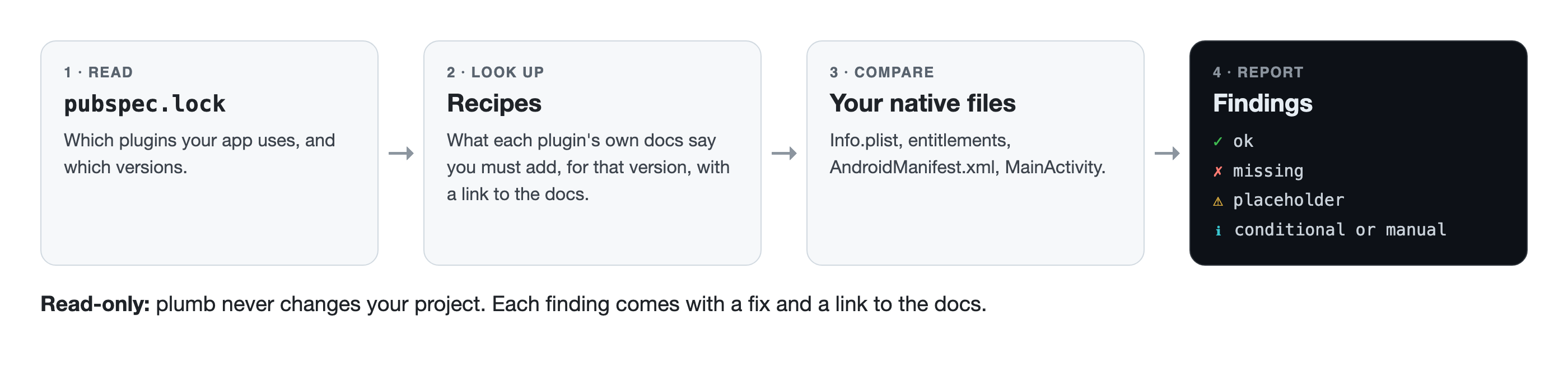
plumb reads pubspec.lock (so it sees plugins that arrive through other packages too), picks
the recipe for each plugin version, and checks Info.plist, entitlements, AndroidManifest.xml
and your MainActivity. Any *UsageDescription that's empty or still placeholder text gets a ⚠,
whether or not plumb has a recipe for the plugin.
![How plumb works: pubspec.lock, then recipes, then your native files, then findings. Read-only.]
(https://dev-to-uploads.s3.us-east-2.amazonaws.com/uploads/articles/ivpm0ad1ewa681istm3t.png)
-
✗ missing, ⚠ placeholder or wrong type, ✓ fine, ℹ only needed for a
feature (see them with
--verbose). - It's read-only. It never changes a file, and it doesn't need a Mac or Xcode.
- If your shell can't find
plumb(common on Windows), rundart pub global run plumb doctor.
Conditional keys show up as ℹ, not as errors, so a gallery-only app doesn't get told off about
the camera:

In CI
- uses: actions/checkout@v4
- uses: dart-lang/setup-dart@v1
- run: dart pub global activate plumb
- run: plumb doctor --strict   # fails on anything missing or still a placeholder
For scripts and AI agents
plumb doctor --json returns every finding with an id, the file, the key, a fix and the doc it
came from:
{
  "id": "image_picker/ios/info_plist/NSPhotoLibraryUsageDescription",
  "severity": "missing",
  "file": "ios/Runner/Info.plist",
  "key": "NSPhotoLibraryUsageDescription",
  "fix": "Add NSPhotoLibraryUsageDescription to Info.plist describing why your app needs the photo library. ...",
  "source": "https://pub.dev/packages/image_picker#ios"
}
That source field matters more than it looks. An agent that can cite the doc behind a change
is one you can review in ten seconds.
What plumb doesn't check (yet)
10 plugins so far. Only the main Info.plist and AndroidManifest.xml: no flavor-specific
files, Gradle, Podfile or AppDelegate (those show up as manual steps). It reports; it doesn't
fix. That's on purpose: I'd rather you trust what it says before you trust it to touch your
project.
Which plugin should get a recipe next? Comment below or
open an issue.
- pub.dev: https://pub.dev/packages/plumb
- GitHub: https://github.com/UmeshRaj7/plumb
Keep your pipes clean. — Umesh
I'm Umesh Raj, a tech lead and AI-first engineer. I ship Flutter, native Android and
full-stack Java/Spring Boot, and I'm building plumb in public.
GitHub · LinkedIn
來源:DEV Community · dev.to