Amazon Bedrock 為 Kimi K3 支援印度境內推理
Introducing India-based inference for Kimi K3 on Amazon Bedrock
Amazon Bedrock 現已支援 Kimi K3 在印度境內推理,透過 in.moonshotai.kimi-k3 inference profile,推理處理會留在 Mumbai 和 Hyderabad 區域內,以符合嚴格的資料駐留要求。文章提供 Python 範例,示範讀取印地語電費單、抽取結構化資料,並以 Hinglish 回答後續問題;亦説明跨區推理選項、權限設定及提示詞快取。
Kimi K3 is a multi-modal, open-weight foundation model (FM) that provider Moonshot AI reported achieved frontier-level coding and general agentic intelligence at release.
In addition to global and US-based inference, Amazon Bedrock now supports in-country inference in India for Kimi K3: unblocking local workloads with strict data residency requirements. Customers like Ultrahuman are already seeing the benefits in production:
“Jade, an AI Health and Wellness assistant in the Ultrahuman app, answers questions in plain language using each person’s own Ring and glucose data, across more than 14,000 conversations a day. Kimi K3 on Amazon Bedrock let us add a leading open-weight model through the API we already use, with health data staying inside AWS and Mumbai as a fallback Region. With prompt caching, we’ve cut LLM costs by 80 percent and made multi-turn chats 85 percent faster.”
— Aditya Patawari, VP Engineering, Ultrahuman
In this post, we explain the different global and geographic inference options available, and share code for an example use case: optical character recognition (OCR) and understanding of Indic-language documents, with follow-up question answering in code-mixed Hinglish.
Choose where inference can run
Kimi K3 on Amazon Bedrock is offered through cross-Region inference profiles. You can invoke the model from any of a wide range of AWS Regions (the “source”). Amazon Bedrock then securely processes your request in one of multiple possible “destination” Regions.
Cross-Region inference is fully managed by AWS: Data is encrypted in transit between Regions and remains on the AWS network, never traversing the public internet or requiring you to set up any multi-Region virtual private cloud (VPC) infrastructure.
The inference profile ID you invoke controls which destination Regions are eligible:
| Profile | Model ID | When to choose it |
| Global | global.moonshotai.kimi-k3 |
Recommended for most use cases: lowest cost and most broadly available |
| India geographic | in.moonshotai.kimi-k3 |
Inference processing must stay within Mumbai and Hyderabad Regions |
See the Amazon Bedrock Kimi K3 model card for up-to-date information on available inference profiles, which AWS Regions they can be called from, and what destination Regions they can use for inference.
Example walkthrough: Indic-language document understanding
Let’s consider an example use case: reading a scanned Hindi document, extracting structured data, and answering follow-up questions in mixed Hindi and English (Hinglish).
This need is common in Indian financial services and public sector workflows where know your customer (KYC) forms, utility bills, and similar documents must often be digitized. Kimi K3 on Amazon Bedrock can directly read and reason about images, including those containing multilingual text. It offers a potential solution with no separate OCR or translation service required.
Prerequisites
The full source code for this example is available on GitHub.
To follow along, you need:
- An AWS account.
- Python 3.11 or later installed, with internet access to install the required PyPI packages.
- The AWS Command Line Interface (AWS CLI) installed, with credentials configured with sufficient AWS Identity and Access Management (IAM) permissions to invoke the Kimi K3 model through the India inference profile.
For example, to use Kimi K3 through the ap-south-1 Mumbai Region with India geographic inference, the following IAM policy grants sufficient access. Replace the {ACCOUNT_ID} placeholders with your AWS account ID:
{
  "Version": "2012-10-17",
  "Statement": [
    {
      "Sid": "BedrockCallWithBearerToken",
      "Effect": "Allow",
      "Action": ["bedrock:CallWithBearerToken"],
      "Resource": ["*"]
    },
    {
      "Sid": "BedrockKimiK3India",
      "Effect": "Allow",
      "Action": [
        "bedrock:InvokeModel",
        "bedrock:InvokeModelWithResponseStream"
      ],
      "Resource": [
        "arn:aws:bedrock:ap-south-1::foundation-model/moonshotai.kimi-k3",
        "arn:aws:bedrock:ap-south-2::foundation-model/moonshotai.kimi-k3",
        "arn:aws:bedrock:ap-south-1:{ACCOUNT_ID}:inference-profile/in.moonshotai.kimi-k3",
        "arn:aws:bedrock:ap-south-1:{ACCOUNT_ID}:project/default"
      ]
    }
  ]
}
For more information about permissions, see Prerequisites for running model inference in the Amazon Bedrock User Guide. If your organization restricts AWS Regions, ask your administrator to review the geographic cross-Region inference IAM and SCP guidance. Keep the source Region permitted and allow routing to both India destinations, using a profile-scoped exception where appropriate. The Responses API guide also describes required default-project access.
Get started with the inference APIs
As detailed on the model card, Amazon Bedrock supports multiple APIs for invoking Kimi K3, all under the Bedrock Runtime endpoint:
| API | Request and response format |
| Chat Completions | OpenAI-compatible messages input and assistant-message output. |
| Responses | OpenAI-compatible input and structured output items. |
| Converse | Standardized messages, content blocks, and inference parameters across supported models. |
| InvokeModel | Model-specific JSON request and response bodies. |
Because the OpenAI-compatible APIs are recommended for this model, we use those in this example and connect through the openai Python Library.
Amazon Bedrock supports generating API keys for integrations that require them. However, AWS recommends using short-lived credentials instead where possible. The AWS token generator Python library derives a short-term API key-like token from the standard AWS CLI credential chain.
If you use a named profile for your AWS CLI, you might need to set the AWS_PROFILE environment variable first. After CLI credentials are set up, you can invoke the model with the following code:
from aws_bedrock_token_generator import provide_token
from openai import OpenAI

region = "ap-south-1"
model_id = "in.moonshotai.kimi-k3"

client = OpenAI(
    base_url=f"https://bedrock-runtime.{region}.amazonaws.com/openai/v1",
    api_key=provide_token(region=region),
)

response = client.chat.completions.create(
    model=model_id,
    messages=[{
        "role": "user",
        "content": "Classify this ticket as billing, technical, or account: I was charged twice."
    }],
    max_completion_tokens=2048,
)

print(response.choices[0].message.content)
Here, region (ap-south-1 Mumbai) specifies the source Region to which the request is made. The inference profile in.moonshotai.kimi-k3 ensures that inference is processed in Indian Regions only.
A broad range of features like streaming, tool calling, and structured outputs are supported across both the Chat Completions and Responses APIs. See the OpenAI Python API Reference for more examples.
Analyze images
Kimi K3 on Amazon Bedrock supports images as well as PDFs and a range of other file types. You can send input files to the model directly by base64-encoding. For OCR or other use cases where small details are important, consider setting the image detail parameter to high. This improves accuracy, at the cost of more input tokens consumed per image.
In some cases, we’ve seen higher output quality for Kimi K3 when images are provided before text inputs. We suggest experimenting with request ordering. Consider the following example code:
from base64 import b64encode

image_path = "sample_data/electricity_bill_hi.png"
with open(image_path, "rb") as f:
    image_base64 = b64encode(f.read()).decode("ascii")

response = client.chat.completions.create(
    model=model_id,
    messages=[
        {
            "role": "user",
            "content": [
                # The model card recommends placing images before text:
                {
                    "type": "image_url",
                    "image_url": {
                        "url": f"data:image/png;base64,{image_base64}",
                        "detail": "high"
                    }
                },
                {"type": "text", "text": QUESTION_PROMPT},
            ]
        },
    ],
    max_completion_tokens=16384,
)

print(response.choices[0].message.content)
To demonstrate, we generated an image of a synthetic electricity bill in Hindi.
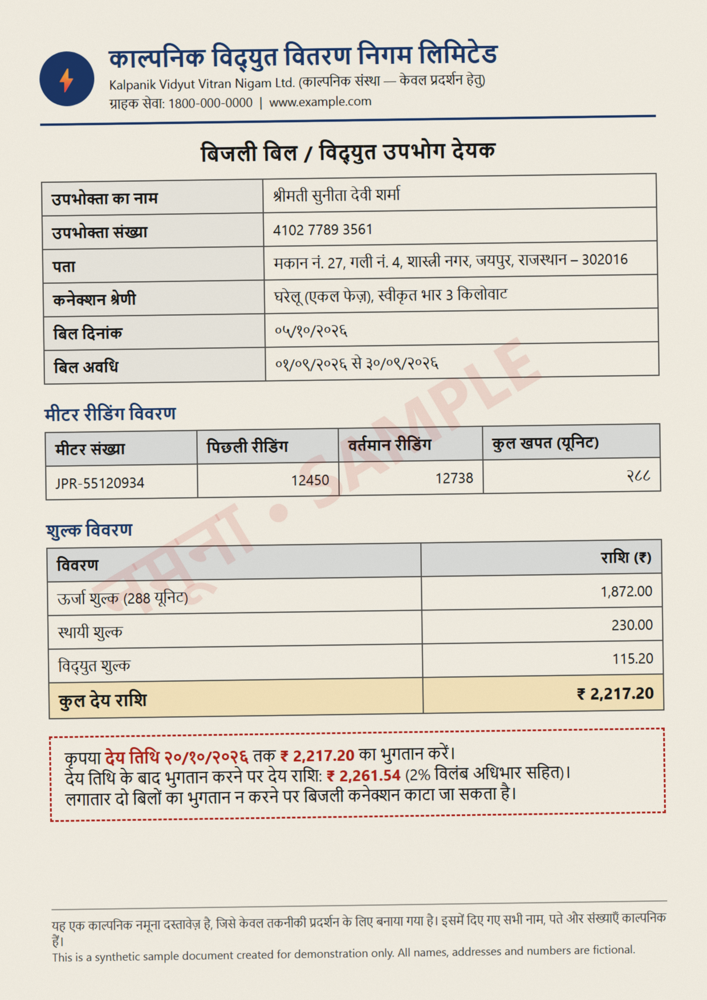
Figure 1: A synthetic Hindi electricity bill from the sample (all sample documents are fictional)
Given this image input, the model can answer questions by pulling data directly from the document with no separate digitization step required. For example:
Q: Bill kitne ka hai aur last date kab hai? Late hua toh kitna dena padega?
A: Bill ka total ₹2,217.20 hai, aur last date 20/10/2026 hai. Late hua toh ₹2,261.54 dena padega.
Build a structured extraction pipeline
Beyond general question-answering, you can create structured document processing workflows by using static prompts to extract a consistent set of expected fields across many documents.
To apply firm constraints on output structure (rather than best-effort prompt-guided generation), Kimi K3 supports structured output on Amazon Bedrock either through function calling or by providing a JSON Schema output format. These options are described in more detail in the OpenAI documentation (for OpenAI-compatible APIs) and the Amazon Bedrock User Guide (for native Converse/InvokeModel APIs).
In the full sample code repository, we’ve provided an end-to-end pipeline that:
- Transcribes the document in its original script (OCR).
- Extracts key fields as JSON using a configurable schema, with dates normalized to ISO 8601 (
YYYY-MM-DD), Devanagari digits (for example २८८) converted to Western digits (288), and names transliterated into English. - Writes a short English summary.
- Answers multi-turn follow-up questions in Hinglish (Hindi written in Latin script, mixed with English) about the same document.
For the same synthetic Hindi electricity bill in the preceding figure, the pipeline returns structured fields such as the following (abbreviated):
{
  "consumer_name": "श्रीमती सुनीता देवी शर्मा",
  "consumer_name_english": "Smt. Sunita Devi Sharma",
  "consumer_number": "410277893561",
  "billing_period": "2026-09-01 to 2026-09-30",
  "due_date": "2026-10-20",
  "units_consumed_kwh": 288,
  "amount_due_inr": 2217.20,
  "amount_after_due_date_inr": 2261.54
}
We’ve also included a KYC form example and an open-ended schema-free mode, where the model selects the most useful fields itself for any other document type. All provided sample documents are synthetic, with fictional names and addresses and masked identity numbers.
Download the sample code from GitHub to explore further and try it out on your own images.
As with any automated extraction, you should verify the outputs are reliable for your specific use case before relying on them for important decisions. Consider adding post-validation logic or a human review step for critical workflows.
Optimize price-performance, service tiers and caching
Tune your system prompts and schemas against example documents for reliable extractions. Amazon Bedrock Advanced Prompt Optimization (AdvPO) provides a fully managed option to optimize prompt templates based on reference examples.
Amazon Bedrock service tiers give you control over price-performance on a per-request basis. For less latency-sensitive cases, you can select the flex tier to enjoy a 50 percent discount on default standard pricing. For latency-critical scenarios, you can select “priority” to request higher queue priority at a higher price. See the pricing page for details.
Use cases with long, seldom-changing content in their input prompts can also benefit from prompt caching on Amazon Bedrock. Make sure the static content (system prompt, tool descriptions, and so on) appears at the beginning of the input, before dynamic sections like the current image and question.
Kimi K3 on Amazon Bedrock supports both discounted pricing for cache hits, as well as an explicit caching mode. In the default implicit caching mode, the service attempts to automatically cache and reuse repeated prompt prefixes between requests with no user action required. However, you can improve performance by selecting the explicit mode and specifying ‘breakpoints’ of cacheable content in your input, boosting cache hit rate, response speed, and cost savings.
The following example shows explicit prompt caching with the Responses API. For more information, see prompt caching in the Amazon Bedrock User Guide:
for call in (1, 2):
    response = client.responses.create(
        model=model_id, max_output_tokens=2048, store=False,
        input=[
            {"type": "message", "role": "system", "content": [{
                "type": "input_text", "text": static_prefix,
                "prompt_cache_breakpoint": {"mode": "explicit"},
            }]},
            {"type": "message", "role": "user", "content": [{
                "type": "input_text", "text": dynamic_prompt,
            }]},
        ],
        extra_body={"prompt_cache_options": {"mode": "explicit"}},
    )
    print(call, response.usage.input_tokens_details.cached_tokens)
Monitor usage
Amazon CloudWatch metrics are automatically generated for Kimi K3 under the AWS/Bedrock namespace, giving visibility of the invocation rate, token counts, cache usage, latency, errors, and throttling.
Model invocation logging is opt-in and can optionally contain prompts and outputs. Review access, retention, and storage location settings before enabling it.
Logs and metrics are stored in the source Region where you submitted your request, regardless of which destination Region might have processed it in cross-Region inference. You can optionally enable AWS CloudTrail data event logging to log model invocations in CloudTrail, which records requests’ destination Region as an additionalEventData.inferenceRegion field.
Clean up
Kimi K3 is billed on a per-token basis, so these code samples don’t provision any persistent AWS resources to clean up. If you created a new IAM Role or User to explore with, or added extra permissions to your existing User/Role, remember to delete them when you’re finished.
Conclusion and next steps
In this post, we explored how Kimi K3 on Amazon Bedrock provides on-demand intelligence capable of understanding mixed Indic and English languages. It now supports fully in-country data processing in India (AWS Mumbai and Hyderabad Regions) through the in.moonshotai.kimi-k3 inference profile.
Try it today in the Amazon Bedrock console or through the inference APIs. Check out the model card for more information, and visit AWS re:Post to find answers or ask the community about Amazon Bedrock.
About the authors

Naomi Teng
Naomi Teng is a Senior AI Go-to-Market Specialist at AWS, based in Sydney and working across Asia Pacific and Japan. She is passionate about helping customers transform their businesses with AI, including open-weight models on Amazon Bedrock, and brings a legal background in intellectual property, privacy, and AI policy to responsible AI. Naomi co-founded the AWS She Builds Mentorship Program and serves on the Board of Directors for Women in AI/ML at Amazon.

Alex Thewsey
Alex is an AI Specialist Solutions Architect at AWS, based in Singapore. He focuses on how open-source technologies and open weight models can help customers around the world to build innovative AI solutions and tackle AI governance challenges.

Rohan Verma
Rohan is an AI Specialist Solutions Architect at AWS working on generative AI. His interests span multi-agent architectures and the design patterns that make autonomous AI systems reliable at scale. He focuses on model deployment, cost optimizations and turning emerging AI research into practical, real-world systems. In his spare time Rohan enjoys reading research papers and convert them into reusable artifacts

Deepinder Tumrate
Deepinder Tumrate is an AI Specialist Solutions Architect at AWS, based in India, where he works with customers to build and scale generative AI solutions across the AWS AI/ML portfolio. He is passionate about helping customers across India adopt AI to solve real-world business challenges and accelerate innovation. Prior to joining AWS, Deepinder worked as a Solutions Architect on the Alexa+ team at Amazon.

Melanie Li
Dr Melanie Li is a Senior Generative AI Specialist Solutions Architect at AWS based in Sydney, Australia, where her focus is on working with customers to build solutions using state-of-the-art AI/ML tools. She has been actively involved in multiple generative AI initiatives across APJ, harnessing the power of LLMs. Prior to joining AWS, Dr. Li held data science roles in the financial and retail industries.

Saurabh Trikande
Saurabh is a Senior Product Manager for Amazon Bedrock and Amazon SageMaker Inference. He is passionate about working with customers and partners, motivated by the goal of democratizing AI. He focuses on core challenges related to deploying complex AI applications, inference with multi-tenant models, cost optimizations, and making the deployment of generative AI models more accessible. In his spare time, Saurabh enjoys hiking, learning about innovative technologies, following TechCrunch, and spending time with his family.
來源:AWS Machine Learning Blog · aws.amazon.com