AWS 宣佈 Amazon SageMaker AI 訓練及處理工作支援 SOCI 索引映像
Announcing SOCI-indexed images for faster SageMaker AI jobs
AWS 宣佈 Amazon SageMaker AI 訓練及處理工作支援 Seekable OCI(SOCI)索引,透過容器映像延遲載入,讓工作數秒內啟動。SageMaker AI 先載入啟動容器所需檔案,再於程式執行期間串流其餘檔案,無須修改工作定義、入口點或資料通道。
文章以不同映像大小及執行個體測試 SOCI 延遲載入,並交代首個 epoch 的額外耗時,方便評估對工作啟動時間的影響。
Every minute your deep learning container image spends downloading is a minute you pay for and a minute your team waits. Container image download is pure overhead: billable job time that produces no model progress. For modern deep learning images, that overhead is several minutes on every single job. Today, we’re excited to announce Seekable OCI (SOCI) indexing for Amazon SageMaker AI Training and Amazon SageMaker AI processing jobs, which takes full container image download off the critical path of every job.
With SOCI indexing, SageMaker AI lazy-loads your container image. It fetches only the files needed to start the container and streams the rest in the background as your code runs, so your job begins in seconds instead of minutes. You adopt it by pointing to a pre-indexed AWS Deep Learning Container (DLC) or adding an index to your own image. Neither approach requires changes to your job definition, entry point, or data channels. The result is faster job starts, lower job cost, and more time spent building models rather than waiting on infrastructure.
SOCI-indexed images start Amazon SageMaker AI training containers in seconds, with no impact on training performance. As we show in the What we measured section, this reduced GPU idle time during image pulls by up to 90 percent in our benchmarks.
This post shows how to adopt SOCI indexing: what it is, the results we measured, and how to turn it on for your own jobs.
The challenge
SageMaker AI training and processing jobs run inside container images stored in Amazon Elastic Container Registry (Amazon ECR). Before a job can execute your code, the service downloads the entire image to the instance. It decompresses and writes every layer to disk.
For small images this takes seconds. But deep learning images routinely exceed 10 GB or more. That download adds minutes to every job, and you pay for it as job time. The impact is largest exactly where iteration speed matters most: hyperparameter tuning sweeps for hundreds of jobs, quick experiments, and short processing jobs, where image download can dominate total runtime.
How SOCI indexing works
Seekable OCI (SOCI) is an open source technology that lazy loads container images. Instead of downloading the whole image before starting, the runtime uses a SOCI index to fetch only the files needed to launch the container immediately. It then streams the rest in the background as your code accesses it.
A SOCI index is metadata that maps every file inside your image. You store it in Amazon ECR as an OCI-compliant artifact linked to your original image. Because the index is a separate artifact, your image digest and any existing signatures remain valid.
SageMaker AI checks for an index automatically
When you create a training or processing job, SageMaker AI checks whether the image you specified has a SOCI index and behaves accordingly:
| Scenario | What happens |
| The image includes a SOCI index | SageMaker AI lazy-loads the image and starts your container before the full download completes |
| The image has no SOCI index | Standard download, no change in behavior |
| The index can’t be read, or lazy loading doesn’t succeed | The job falls back to a standard download and continues running |
Because jobs always fall back to a standard download when needed, adding a SOCI index never prevents your job from running. You only gain faster startup. You never risk breaking an existing workflow.
What we measured
We pulled the same container images two ways on real SageMaker AI training jobs: standard download and SOCI-indexed lazy loading. We then ran full training jobs from both to measure the effect on training speed.
Setup
- Eight images, 1.8–35.4 GB compressed.
- GPU and CPU instances ml.g4dn, ml.g5, ml.g6, ml.g6e, ml.g7, ml.g7e, ml.p4d, ml.p5, and ml.m7i, from xlarge to 48xlarge, in the US West (Oregon) Region (us-west-2) and the US East (N. Virginia) Region (us-east-1).
- Download time measured from the start of the image pull until the container is ready to run. All figures are medians of repeated runs.
Result 1: Download time drops from minutes to seconds at every image size
| Image size (compressed) | Standard download | Lazy loading | Improvement |
| 1.8 GB | 48 s | 3-11 s | ~8x |
| 13.2 GB | 3 min 42 s | ~6 s | ~34x |
| 35.4 GB | 7 min 17 s | 3-11 s | ~38x |
The following chart compares container image download time for a standard Docker pull against SOCI lazy loading across eight image sizes, from 1.8 GB to 35.4 GB.
Each image size shows two bars. The Docker download time bar (blue) grows steadily with image size, from 48 seconds at 1.8 GB to 7 minutes 17 seconds at 35.4 GB.
A speedup label above each pair shows the ratio of Docker time to SOCI time. Speedups range from approximately 10x for the smallest image to over 35x for the largest.
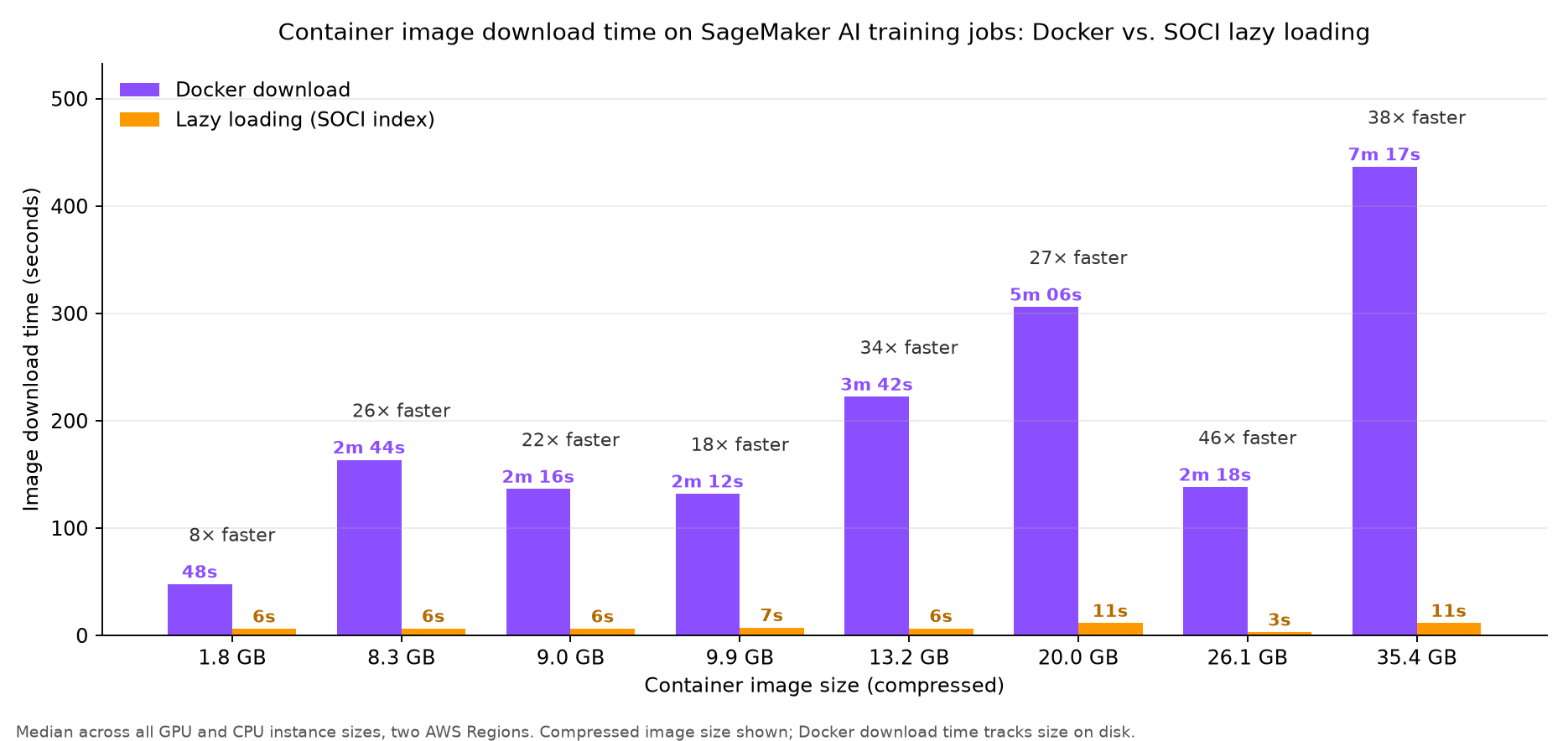
Figure 1: Container image download time, standard Docker pull compared to SOCI lazy loading, across eight image sizes
Standard download time grows with image size because every file is decompressed and written. Lazy loading stayed at 3–11 seconds regardless of size, an 8x–46x improvement. The bigger the image, the more minutes you save.
Result 2: The saving holds on every instance type and size
Running the 13.2 GB image across 13 instance type/size combinations, standard download ranged from 3 min 16 s to 4 min 20 s, while lazy loading held at 6-8 s. That is about 34x faster on every configuration. You don’t need to change instance type or size to benefit.
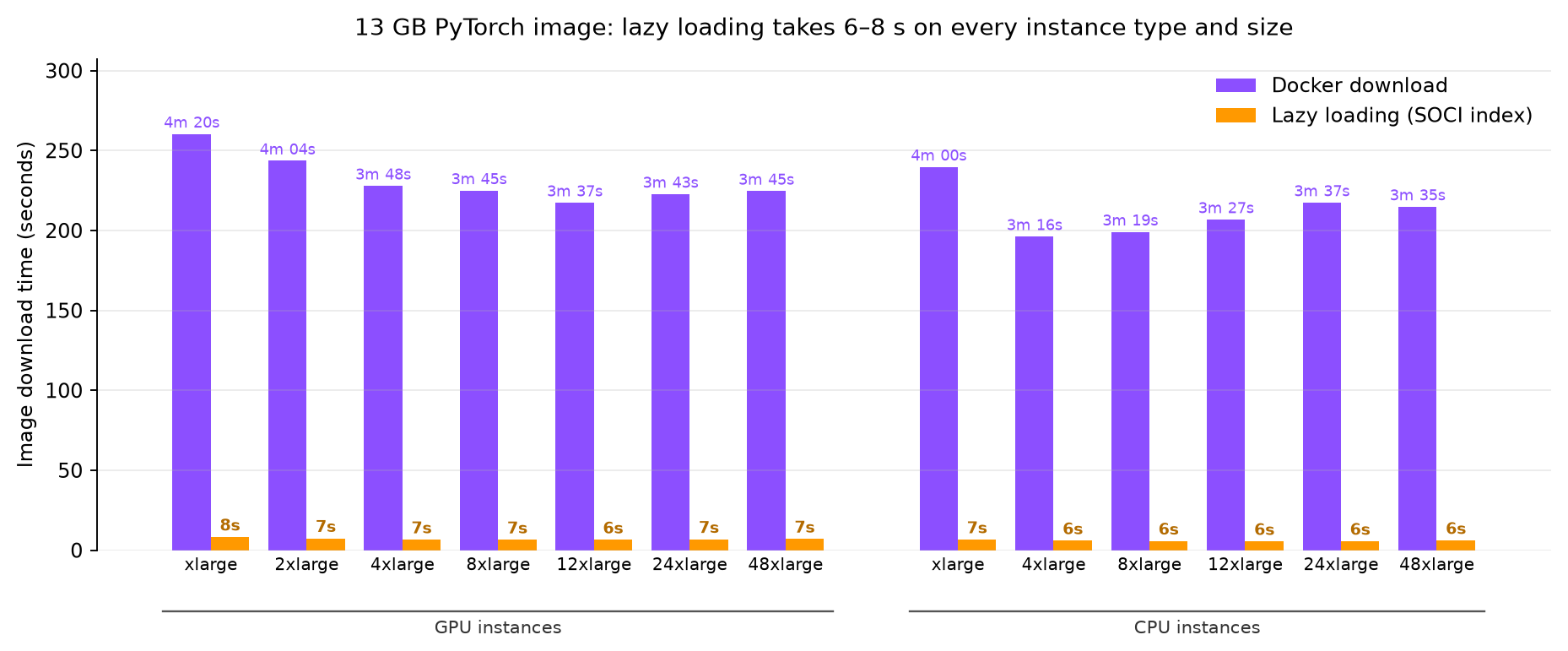
Figure 2: Download time for a 13.2 GB image across 13 instance type and size combinations
Result 3: Training performance is unaffected beyond a first-epoch penalty
We ran two kinds of full training jobs from the Docker-pulled and from the SOCI-indexed image and compared every epoch:
- Image classification on ResNet-50 on Imagenette (9,469 images)
- Container images: PyTorch (13.2 GB DLC) and TensorFlow (9.9 GB DLC)
- Instances: ml.p5.48xlarge, ml.p4d.24xlarge, ml.g7e.48xlarge, ml.g7.48xlarge, ml.g6e.12xlarge, ml.g6e.24xlarge, and ml.g6e.48xlarge.
- Large language model (LLM) fine-tuning: full-parameter supervised fine-tuning (SFT) of Qwen2.5-0.5B on alpaca-cleaned (51,760 examples) with the Hugging Face Trainer.
- Container image: 9.4 GB Hugging Face PyTorch DLC.
- Instances: ml.p5.48xlarge, ml.p4d.24xlarge, ml.g6.48xlarge.
The following chart breaks job startup into image download time and first training epoch time, comparing a standard Docker pull with a SOCI-indexed image across GPU and CPU configurations for both workloads.
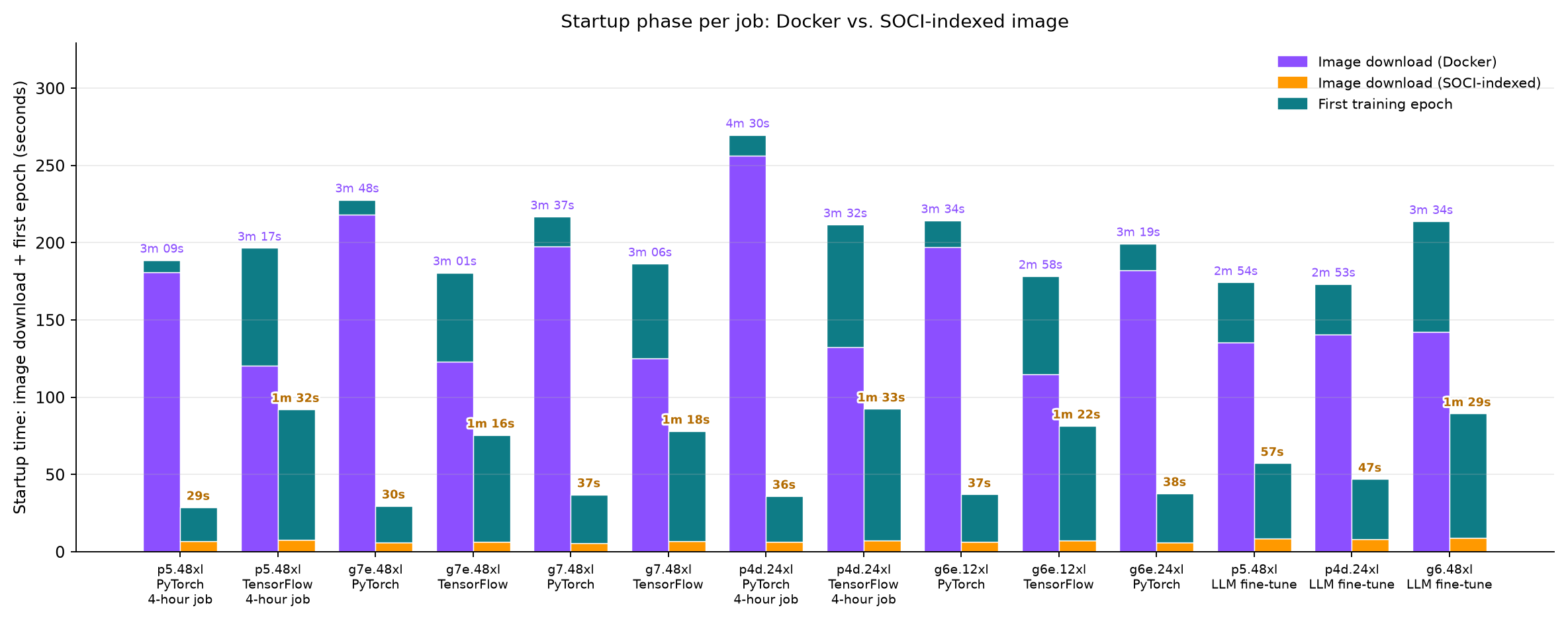
Figure 3: Job startup split into image download time and first training epoch time, standard Docker pull compared to a SOCI-indexed image
- From the second epoch on, time per epoch is the same (within run-to-run variation) on every instance, for both workloads.
- The first epoch takes 3–16 s longer from the lazy-loaded image, while files the framework touches for the first time are fetched. This first-epoch cost is the same on every instance size.
- Net: each job finished 1-6 min sooner. That is the download saving minus the one-time first-epoch cost, a fixed saving per job.
Test this on your own workload
These numbers are from the two workloads described earlier. The first-epoch cost depends on your image and what your code touches at startup:
- Lazy loading wins when the first training step needs only a fraction of the image, the rest streams in while you train.
- If your entry point reads most of the image before training starts (for example, scanning, checksumming, or preloading its contents), the first epoch waits for roughly the same bytes a full pull would have fetched. The net improvement would be small.
- Front-loaded starts still came out ahead in our tests:
- torch.compile and a just-in-time (JIT) built CUDA extension added 7-15 s to the first epoch (net saving still 3 min 25 s–3 min 56 s)
- A 6 GB model baked into the image streamed its weights at load time, adding 2-3.5 min, but the overall job still finished 2-2.5 mins sooner on the indexed image.
Getting started
You can adopt SOCI indexing two ways: use a pre-indexed AWS Deep Learning Container or create an index for your own custom image.
Option 1: Use a pre-indexed AWS Deep Learning Container
AWS publishes SOCI-indexed variants of several popular Deep Learning Containers, identified by the -soci suffix on the image tag:
763104351884.dkr.ecr.us-east-1.amazonaws.com/pytorch-training:2.9-gpu-py312-cu130-ubuntu22.04-sagemaker-v1-sociPre-indexed variants are available for PyTorch Training, TensorFlow Training, vLLM, and SGLang, including arm64 variants for some frameworks. To adopt lazy loading, update the image tag in your job definition to the -soci variant. Browse the full list in the AWS Deep Learning Containers Gallery.
Note: If you build your own image FROM a DLC base image, you must create a SOCI index for your final image. The index from the base image does not carry forward to derived images.
Option 2: Create a SOCI index for your own image
To index a custom image, you need a Linux host (such as an Amazon Elastic Compute Cloud (Amazon EC2) instance running Amazon Linux 2023) with containerd, the SOCI snapshotter, and either Finch or nerdctl installed.
- Set your environment variables.
ACCOUNT_ID="111122223333" REGION="us-east-1" REPOSITORY_NAME="my-training-image" ORIGINAL_IMAGE_TAG="v1.0" SOCI_IMAGE_TAG="v1.0-soci" REGISTRY="$ACCOUNT_ID.dkr.ecr.$REGION.amazonaws.com" - Install the required tools.
sudo dnf install -y containerd fuse soci-snapshotter runfinch-finch sudo systemctl start soci-snapshotter sudo systemctl restart containerd - Authenticate to Amazon ECR.
aws ecr get-login-password --region "$REGION" \ | sudo nerdctl login -u AWS --password-stdin "$REGISTRY" - Pull your original image.
sudo nerdctl pull "$REGISTRY/$REPOSITORY_NAME:$ORIGINAL_IMAGE_TAG" - Create the SOCI-indexed image.
sudo nerdctl image convert --soci \ "$REGISTRY/$REPOSITORY_NAME:$ORIGINAL_IMAGE_TAG" \ "$REGISTRY/$REPOSITORY_NAME:$SOCI_IMAGE_TAG" - Push the indexed image.
sudo nerdctl push --platform linux/amd64 \
  "$REGISTRY/$REPOSITORY_NAME:$SOCI_IMAGE_TAG"
This creates two artifacts in your repository: the SOCI index and an OCI-compliant image index manifest linking your image to the index. Your original image and its digest remain unchanged.
Automate index creation in CI/CD
To generate indexes automatically on every push, deploy the CFN ECR SOCI Index Builder. It uses an Amazon EventBridge rule to detect Amazon ECR image push events and build the index. No changes to your build pipeline are required.
Use the indexed image in your SageMaker AI job
Reference your SOCI-indexed image exactly as you would any other image. No API changes are needed. Only the tag differs.
Training example (SageMaker Python SDK)
from sagemaker.train import ModelTrainer
from sagemaker.train.configs import Compute

trainer = ModelTrainer(
    training_image="111122223333.dkr.ecr.us-east-1.amazonaws.com/my-training-image:v1.0-soci",
    role="arn:aws:iam::111122223333:role/SageMakerExecutionRole",
    compute=Compute(
        instance_type="ml.g5.12xlarge",
        instance_count=2,
    ),
)

trainer.train()
Verify that your image includes a SOCI index
Before launching, confirm your tag resolves to an indexed image:
aws ecr batch-get-image \
  --repository-name "$REPOSITORY_NAME" \
  --image-ids imageTag="$SOCI_IMAGE_TAG" \
  --accepted-media-types \
  "application/vnd.oci.image.index.v1+json" \
  --query 'images[0].imageManifest' --output text \
  | jq '.manifests[] | {mediaType, artifactType}'
Look for a child manifest whose artifactType begins with application/vnd.amazon.soci.index. alongside your platform manifest. If it isn’t there, the tag does not point to an indexed image.
Things to keep in mind
- Amazon ECR private repositories only. Images in other registries, or pulled through a private Docker registry (TrainingRepositoryAccessMode set to Vpc), are not eligible for lazy loading.
- Improvement scales with image size. Images smaller than roughly 4 GB see relatively small improvements.
- Check for Docker-specific assumptions. SOCI-indexed images run on a containerd-based runtime. Review entry points and setup scripts for code that calls the Docker CLI, reads /var/run/docker.sock, or derives identifiers from cgroup paths. SageMaker AI mounts a /.dockerenv marker for backward compatibility, but avoid adding new dependencies on it.
- SOCI indexing for SageMaker AI jobs is available across all AWS Regions.
Conclusion
With SOCI indexing, you can minimize container image download time from your SageMaker AI training and processing jobs. Add a SOCI index to your images, or switch to a pre-indexed AWS Deep Learning Container. Either way, you cut startup time from minutes to seconds, reduce total job cost, and accelerate your machine learning (ML) iteration cycle. And your existing job definitions, API calls, and data pipelines stay exactly the same.
To learn more about Amazon SageMaker AI and start using SOCI indexing, explore the following resources:
- Pick a SOCI-indexed Deep Learning Container. Browse the Deep Learning Containers Gallery and append -soci to your image tag. For framework-specific guidance, see SOCI index for AWS Deep Learning Containers.
- Index your own custom image. Follow the step-by-step walkthrough in the SageMaker AI Developer Guide, or refer to the SOCI snapshotter getting-started guide for advanced options.
- Automate indexing in your CI/CD pipeline. Deploy the CFN ECR SOCI Index Builder to generate indexes automatically on every image push. No pipeline changes are required.
- Test locally with Finch. Use the Finch lazy-loading walkthrough to validate your image on a containerd-based runtime before you submit a job.
- Dive deeper into the technology. Read Reducing container cold start times using SOCI index on DLAMI and DLC on the AWS Machine Learning Blog for benchmarks, or explore Under the hood: Lazy loading container images with Seekable OCI and AWS Fargate on the AWS Containers Blog to understand the lazy-loading mechanism in detail.
Faster container startup is only one image tag away. Try it on your next SageMaker AI job and see the difference.
About the authors

Kanwaljit Khurmi
Kanwaljit is a Senior Manager of Solutions Architecture and Data Scientists at Amazon Web Services, specializing in AI and ML. He collaborates with AWS product teams, engineering, and customers to provide guidance and technical assistance for maximizing the value of their hybrid GenAI solutions on AWS. Kanwaljit specializes in helping customers with containerized, data science, and machine learning applications.

Mona Mona
Mona currently works as Sr AI/ML specialist Solutions Architect at Amazon. She is a published author of three books and her latest book is AI Agents on AWS. She has authored 20+ blogs on AI/ML and cloud technology and a co-author on a research paper on CORD19 Neural Search which won an award for Best Research Paper at the prestigious AAAI (Association for the Advancement of Artificial Intelligence) conference.

Michael Oguike
Michael is a Product Manager for Amazon SageMaker AI. He is driven by the application of technology and AI to solve real-world problems. At AWS, he helps customers across industries build, train, and deploy AI/ML models at scale. Before AWS, Michael designed and operated offshore oil and gas wells and facilities. Outside of work he enjoys exploring behavioral science and psychology through books and podcast.

Deep Shah
Deep is a Software Development Engineer on the Amazon SageMaker team, where he works on the infrastructure that powers model training on AWS. When he’s not scaling training systems, he enjoys sim racing, reading, and traveling.
來源:AWS Machine Learning Blog · aws.amazon.com