Hugging Face 推出 TGI Messages API,兼容 OpenAI Chat Completion API
From OpenAI to Open LLMs with Messages API on Hugging Face
Hugging Face 宣佈 TGI 自 1.4.0 起提供兼容 OpenAI Chat Completion API 的 Messages API,並將其提供於 Inference Endpoints。
文中以 Python、JavaScript、LangChain 和 LlamaIndex 示範如何沿用 OpenAI 相容介面接入開放模型,並交代 function calling 等限制。
我們很高興推出 Messages API,讓 Text Generation Inference(TGI)和 Inference Endpoints 相容於 OpenAI API。
TGI 自 1.4.0 版起支援相容 OpenAI Chat Completion API 的 API。全新的 Messages API 讓客戶和用戶能無縫從 OpenAI 模型轉用開源 LLM。你可以直接透過 OpenAI 用戶端函式庫或 LangChain、LlamaIndex 等第三方工具使用此 API。
「全新的 Messages API 與 OpenAI 相容,令 Ryght 的即時 GenAI 協調平台能輕鬆地把各類 LLM 使用情境從 OpenAI 切換至開源模型。我們在 Inference Endpoints 上從 GPT4 遷移至 Mixtral/Llama2 毫不費力,現在的工作流程亦更簡單,讓我們能更好地掌控 AI 解決方案。」——技術總監 Johnny Crupi,任職於 Ryght
全新的 Messages API 現亦已在 Inference Endpoints 提供,支援專用和無伺服器兩種形式。為讓你快速開始,我們附上詳細示例,説明如何:
限制: Messages API 目前不支援函式調用,而且只適用於 tokenizer 設定中定義了 chat_template 的 LLM,例如 Mixtral 8x7B Instruct。
建立 Inference Endpoint
Inference Endpoints 提供安全且適用於生產環境的解決方案,讓你輕鬆在由 Hugging Face 管理的專用基礎設施上部署 Hub 中的任何機器學習模型。
在此示例中,我們會使用 Nous-Hermes-2-Mixtral-8x7B-DPO,這款經微調的 Mixtral 模型,並透過 Text Generation Inference 部署至 Inference Endpoints。
我們只需在介面點擊幾下即可部署模型,亦可使用 huggingface_hub Python 函式庫,以程式方式建立和管理 Inference Endpoints。以下示範如何使用 Hub 函式庫。
在下方的 API 呼叫中,我們需要指定端點名稱和模型儲存庫,以及 text-generation 任務。此例會使用 protected 類型,因此必須提供有效的 Hugging Face token 才可存取已部署端點。我們亦須設定硬件要求,例如供應商、地區、加速器、執行個體類型和大小。你可以透過此 API 呼叫查看可用資源選項清單,亦可在此查看型號目錄中部分模型的建議設定。
注意:你可能需要透過電郵 api-enterprise@huggingface.co 申請提高配額。
from huggingface_hub import create_inference_endpoint

endpoint = create_inference_endpoint(
    "nous-hermes-2-mixtral-8x7b-demo",
    repository="NousResearch/Nous-Hermes-2-Mixtral-8x7B-DPO",
    framework="pytorch",
    task="text-generation",
    accelerator="gpu",
    vendor="aws",
    region="us-east-1",
    type="protected",
    instance_type="nvidia-a100",
    instance_size="x2",
    custom_image={
        "health_route": "/health",
        "env": {
            "MAX_INPUT_LENGTH": "4096",
            "MAX_BATCH_PREFILL_TOKENS": "4096",
            "MAX_TOTAL_TOKENS": "32000",
            "MAX_BATCH_TOTAL_TOKENS": "1024000",
            "MODEL_ID": "/repository",
        },
        "url": "ghcr.io/huggingface/text-generation-inference:sha-1734540", # use this build or newer
    },
)

endpoint.wait()
print(endpoint.status)
部署需要幾分鐘才能啟動。我們可以使用 .wait() 工具,讓目前執行緒等待至端點進入最終的「running」狀態。端點運行後,我們便可確認狀態,並透過 UI Playground 試用:
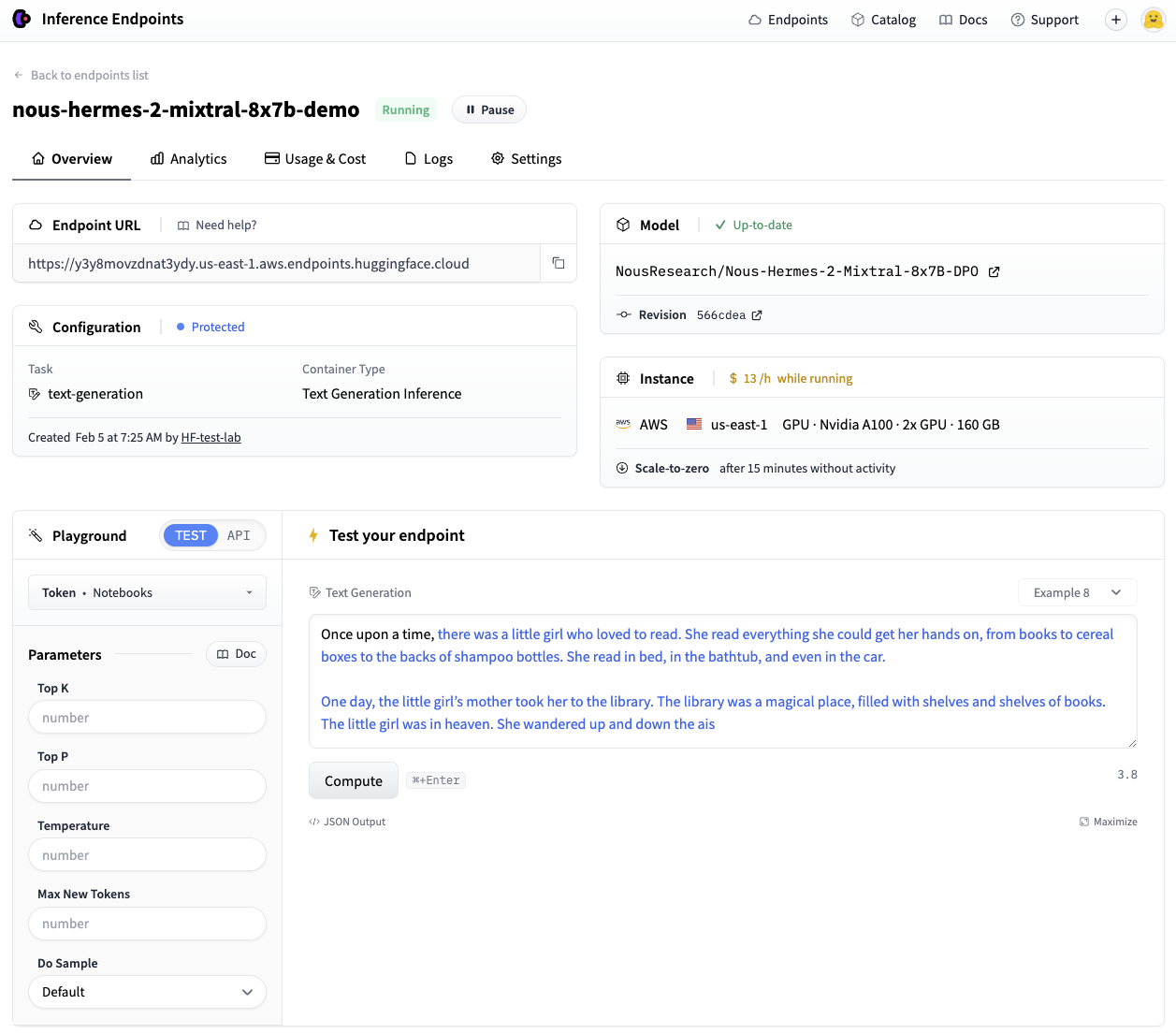
很好,現在已有可運作的端點!
💡 透過
huggingface_hub部署時,預設情況下,端點閒置 15 分鐘後會自動縮減至零,以降低閒置期間的成本。請參閲Hub Python 函式庫説明文件,瞭解管理端點生命週期的所有功能。
使用 OpenAI 用戶端函式庫連接 Inference Endpoints
TGI 支援 Messages 後,Inference Endpoints 便可直接相容 OpenAI Chat Completion API。也就是説,任何使用 OpenAI 用戶端函式庫呼叫 OpenAI 模型的現有指令碼,都可直接改為使用在 TGI 端點上執行的任意開源 LLM!
只要無縫切換,你便可立即享用開源模型的多項優勢:
- 全面掌控模型和資料,資訊亦完全透明
- 不用再擔心速率限制
- 可按你的特定需求全面自訂系統
來看看如何操作。
使用 Python 用戶端
以下示例展示如何使用 OpenAI Python 函式庫進行切換。只要把 <ENDPOINT_URL> 換成你的端點 URL(請確保包含 v1/ 後綴),並在 <HF_API_TOKEN> 欄位填入有效的 Hugging Face 用戶 token。你可以從 Inference Endpoints 介面取得 <ENDPOINT_URL>,或從上方建立的端點物件取得 endpoint.url。
然後像平常一樣使用用戶端,傳入訊息清單,從 Inference Endpoint 串流取得回應。
from openai import OpenAI

# initialize the client but point it to TGI
client = OpenAI(
    base_url="<ENDPOINT_URL>" + "/v1/",  # replace with your endpoint url
    api_key="<HF_API_TOKEN>",  # replace with your token
)
chat_completion = client.chat.completions.create(
    model="tgi",
    messages=[
        {"role": "system", "content": "You are a helpful assistant."},
        {"role": "user", "content": "Why is open-source software important?"},
    ],
    stream=True,
    max_tokens=500
)

# iterate and print stream
for message in chat_completion:
    print(message.choices[0].delta.content, end="")
在幕後,TGI 的 Messages API 會使用模型的聊天範本,自動把訊息清單轉換為模型所需的指令格式。
💡 TGI 不支援 OpenAI 的部分功能,例如函式調用。目前 Messages API 支援以下聊天完成參數:
stream、max_tokens、frequency_penalty、logprobs、seed、temperature和top_p。
使用 JavaScript 用戶端
以下是前述相同的串流示例,但改用 OpenAI Javascript/Typescript 函式庫。
import OpenAI from "openai";

const openai = new OpenAI({
  baseURL: "<ENDPOINT_URL>" + "/v1/", // replace with your endpoint url
  apiKey: "<HF_API_TOKEN>", // replace with your token
});

async function main() {
  const stream = await openai.chat.completions.create({
    model: "tgi",
    messages: [
      { role: "system", content: "You are a helpful assistant." },
      { role: "user", content: "Why is open-source software important?" },
    ],
    stream: true,
    max_tokens: 500,
  });
  for await (const chunk of stream) {
    process.stdout.write(chunk.choices[0]?.delta?.content || "");
  }
}

main();
整合 LangChain 和 LlamaIndex
現在來看看如何在你偏好的 RAG 框架中使用這個新建端點。
如何在 LangChain 中使用
如要在 LangChain 中使用,只需建立一個 ChatOpenAI 執行個體,並按以下方式傳入 <ENDPOINT_URL> 和 <HF_API_TOKEN>:
from langchain_community.chat_models.openai import ChatOpenAI

llm = ChatOpenAI(
    model_name="tgi",
    openai_api_key="<HF_API_TOKEN>",
    openai_api_base="<ENDPOINT_URL>" + "/v1/",
)
llm.invoke("Why is open-source software important?")
我們可以直接沿用之前使用 OpenAI 模型時採用的 ChatOpenAI 類別,只需改動一行程式碼,所有原有程式碼便可配合端點使用。
現在來看看如何在簡單的 RAG 流程中使用這種方式宣告的 LLM,回答 Hugging Face 網誌文章內容相關問題。
from langchain_core.runnables import RunnableParallel
from langchain_community.embeddings import HuggingFaceEmbeddings

# Load, chunk and index the contents of the blog
loader = WebBaseLoader(
    web_paths=("https://huggingface.co/blog/open-source-llms-as-agents",),
)
docs = loader.load()

# Declare an HF embedding model and vector store
hf_embeddings = HuggingFaceEmbeddings(model_name="BAAI/bge-large-en-v1.5")

text_splitter = RecursiveCharacterTextSplitter(chunk_size=512, chunk_overlap=200)
splits = text_splitter.split_documents(docs)
vectorstore = Chroma.from_documents(documents=splits, embedding=hf_embeddings)

# Retrieve and generate using the relevant pieces of context
retriever = vectorstore.as_retriever()
prompt = hub.pull("rlm/rag-prompt")

def format_docs(docs):
    return "\n\n".join(doc.page_content for doc in docs)

rag_chain_from_docs = (
    RunnablePassthrough.assign(context=(lambda x: format_docs(x["context"])))
    | prompt
    | llm
    | StrOutputParser()
)

rag_chain_with_source = RunnableParallel(
    {"context": retriever, "question": RunnablePassthrough()}
).assign(answer=rag_chain_from_docs)

rag_chain_with_source.invoke("According to this article which open-source model is the best for an agent behaviour?")
{
    "context": [...],
    "question": "According to this article which open-source model is the best for an agent behaviour?",
    "answer": " According to the article, Mixtral-8x7B is the best open-source model for agent behavior, as it performs well and even beats GPT-3.5. The authors recommend fine-tuning Mixtral for agents to potentially surpass the next challenger, GPT-4.",
}
如何在 LlamaIndex 中使用
同樣地,你也可以在 LlamaIndex 中使用 TGI 端點。我們會使用 OpenAILike 類別,並透過設定其他參數(即 is_local、is_function_calling_model、is_chat_model、context_window)建立執行個體。請注意,上下文視窗參數應與先前為端點設定的 MAX_TOTAL_TOKENS 數值一致。
from llama_index.llms import OpenAILike

# Instantiate an OpenAILike model
llm = OpenAILike(
    model="tgi",
    api_key="<HF_API_TOKEN>",
    api_base="<ENDPOINT_URL>" + "/v1/",
    is_chat_model=True,
    is_local=False,
    is_function_calling_model=False,
    context_window=32000,
)

# Then call it
llm.complete("Why is open-source software important?")
現在可以在相似的 RAG 流程中使用。請留意,你為 Inference Endpoint 選擇的 MAX_INPUT_LENGTH,會直接影響模型可處理的檢索區塊數量(similarity_top_k)。
from llama_index import (
    ServiceContext,
    VectorStoreIndex,
)
from llama_index import download_loader
from llama_index.embeddings import HuggingFaceEmbedding
from llama_index.query_engine import CitationQueryEngine

SimpleWebPageReader = download_loader("SimpleWebPageReader")

documents = SimpleWebPageReader(html_to_text=True).load_data(
    ["https://huggingface.co/blog/open-source-llms-as-agents"]
)

# Load embedding model
embed_model = HuggingFaceEmbedding(model_name="BAAI/bge-large-en-v1.5")

# Pass LLM to pipeline
service_context = ServiceContext.from_defaults(embed_model=embed_model, llm=llm)
index = VectorStoreIndex.from_documents(
    documents, service_context=service_context, show_progress=True
)

# Query the index
query_engine = CitationQueryEngine.from_args(
    index,
    similarity_top_k=2,
)
response = query_engine.query(
    "According to this article which open-source model is the best for an agent behaviour?"
)
According to the article, Mixtral-8x7B is the best performing open-source model for an agent behavior [5]. It even beats GPT-3.5 in this task. However, it's worth noting that Mixtral's performance could be further improved with proper fine-tuning for function calling and task planning skills [5].
清理資源
使用完端點後,你可以暫停或刪除端點。你可以透過介面,或使用以下程式方式完成這個步驟。
# pause our running endpoint
endpoint.pause()

# optionally delete
endpoint.delete()
總結
Text Generation Inference 的全新 Messages API,提供從 OpenAI 模型平順轉用開源 LLM 的途徑。我們很期待看到你會如何運用在 TGI 上執行的開源 LLM!
如要執行本文中的程式碼,請參閲這份 notebook。
來源:Hugging Face Blog · huggingface.co