如何使用 Transformers 的不同解碼方法生成文字
How to generate text: using different decoding methods for language generation with Transformers
Hugging Face 的 Transformers 教程以 GPT2 示範如何實作多種文字生成解碼方法。文章介紹貪心搜尋、束搜尋、temperature、Top-K 及 Top-p 採樣,説明各方法對重複、流暢度與隨機性的影響,並指出沒有一種方法適用所有開放式生成場景。
文章以 GPT2 和 Transformers 範例比較貪心搜尋、Beam search 與 Top-K、Top-p 採樣,呈現各方法在生成重複、流暢度與隨機性上的取捨。

注意:於 2023 年 7 月更新,加入最新參考資料及示例。
引言
近年,隨着大型 Transformer 架構語言模型興起,開放式語言生成愈來愈受關注;這些模型以數以百萬計的網頁訓練,包括 OpenAI 的 ChatGPT,以及 Meta 的 LLaMA。以條件為基礎的開放式語言生成成果令人印象深刻,已展示出能夠泛化至新任務、處理程式碼,或以非文字資料作為輸入。除了改良 Transformer 架構和大量無監督訓練資料外,更好的解碼方法亦發揮了重要作用。
本文會簡要概述不同的解碼策略,更重要的是,展示你如何只需付出少量工夫,就能使用廣受歡迎的 transformers 程式庫實作這些方法!
以下所有功能均可用於自回歸語言生成(可在此處重温)。簡言之,自回歸語言生成建基於以下假設:一串詞語的機率分佈,可以分解為各個條件式下一詞機率分佈的乘積:
P(w1:T∣W0)=∏t=1TP(wt∣w1:t−1,W0) ,with w1:0=∅, P(w_{1:T} | W_0 ) = \prod_{t=1}^T P(w_{t} | w_{1: t-1}, W_0) \text{ ,with } w_{1: 0} = \emptyset,
而 W0W_0 是初始的上下文詞語序列。詞語序列的長度 TT 通常會即時確定,對應於生成 EOS token 時的時間步 t=Tt=T,該 token 來自 P(wt∣w1:t−1,W0)P(w_{t} | w_{1: t-1}, W_{0})。
我們會逐一介紹目前最主要的解碼方法,主要包括貪婪搜尋、束搜尋及抽樣。
先快速安裝 transformers 並載入模型。我們會用 PyTorch 中的 GPT2 作示範,但 TensorFlow 和 JAX 的 API 亦是 1 對 1 相同。
!pip install -q transformers
from transformers import AutoModelForCausalLM, AutoTokenizer
import torch

torch_device = "cuda" if torch.cuda.is_available() else "cpu"

tokenizer = AutoTokenizer.from_pretrained("gpt2")

# add the EOS token as PAD token to avoid warnings
model = AutoModelForCausalLM.from_pretrained("gpt2", pad_token_id=tokenizer.eos_token_id).to(torch_device)
貪婪搜尋
貪婪搜尋是最簡單的解碼方法。它會在每個時間步選擇機率最高的詞語作為下一個詞語:wt=argmaxwP(w∣w1:t−1)w_t = argmax_{w}P(w | w_{1:t-1}),每一步 tt 都如此。下圖示意貪婪搜尋。

由詞語 "The",\text{"The"}, 開始,演算法會貪婪地選取機率最高的下一個詞語 "nice"\text{"nice"},如此類推,最後生成的詞語序列為 ("The","nice","woman")(\text{"The"}, \text{"nice"}, \text{"woman"}),整體機率為 0.5×0.4=0.20.5 \times 0.4 = 0.2。
以下會以 GPT2 根據上下文 ("I","enjoy","walking","with","my","cute","dog")(\text{"I"}, \text{"enjoy"}, \text{"walking"}, \text{"with"}, \text{"my"}, \text{"cute"}, \text{"dog"}) 生成詞語序列。看看如何在 transformers 中使用貪婪搜尋:
# encode context the generation is conditioned on
model_inputs = tokenizer('I enjoy walking with my cute dog', return_tensors='pt').to(torch_device)

# generate 40 new tokens
greedy_output = model.generate(**model_inputs, max_new_tokens=40)

print("Output:\n" + 100 * '-')
print(tokenizer.decode(greedy_output[0], skip_special_tokens=True))
Output:
----------------------------------------------------------------------------------------------------
I enjoy walking with my cute dog, but I'm not sure if I'll ever be able to walk with my dog. I'm not sure if I'll ever be able to walk with my dog.

I'm not sure
好!我們已用 GPT2 生成第一段短文字 😊。接在上下文之後生成的詞語看來合理,但模型很快就開始重複自己!這是語言生成常見的問題,在貪婪搜尋和束搜尋中似乎尤其嚴重;可參閲 Vijayakumar 等人,2016 和 Shao 等人,2017。
不過,貪婪搜尋的主要缺點是:正如上圖所示,它會錯過藏在低機率詞語後面的高機率詞語:
詞語 "has"\text{"has"} 的條件機率雖然很高,達 0.90.9,卻藏在詞語 "dog"\text{"dog"} 後面;後者的條件機率只排第二。因此,貪婪搜尋會錯過詞語序列 "The","dog","has"\text{"The"}, \text{"dog"}, \text{"has"}。
幸好,我們可以用束搜尋緩解這個問題!
束搜尋
束搜尋會在每個時間步保留最有可能的 num_beams 個假設,最後再選取整體機率最高的假設,從而降低錯過隱藏高機率詞語序列的風險。以下以 num_beams=2 説明:

在時間步 1,除了最可能的假設 ("The","nice")(\text{"The"}, \text{"nice"}),束搜尋也會追蹤第二可能的假設 ("The","dog")(\text{"The"}, \text{"dog"})。到時間步 2,束搜尋發現詞語序列 ("The","dog","has")(\text{"The"}, \text{"dog"}, \text{"has"}) 的機率為 0.360.36,高於 ("The","nice","woman")(\text{"The"}, \text{"nice"}, \text{"woman"}) 的 0.20.2。太好了,它在這個簡化例子中找到了最可能的詞語序列!
束搜尋找到的輸出序列,其機率必定高於貪婪搜尋的輸出,但不保證是最可能的輸出。
看看如何在 transformers 中使用束搜尋。我們設定 num_beams > 1 和 early_stopping=True,當所有束假設都到達 EOS token 時便完成生成。
# activate beam search and early_stopping
beam_output = model.generate(
    **model_inputs,
    max_new_tokens=40,
    num_beams=5,
    early_stopping=True
)

print("Output:\n" + 100 * '-')
print(tokenizer.decode(beam_output[0], skip_special_tokens=True))
Output:
----------------------------------------------------------------------------------------------------
I enjoy walking with my cute dog, but I'm not sure if I'll ever be able to walk with him again.

I'm not sure if I'll ever be able to walk with him again. I'm not sure
雖然結果可説更流暢,輸出仍會重複相同的詞語序列。一種可用的補救方法是引入 n-gram(又稱由 n 個詞語組成的序列)懲罰,由 Paulus 等人(2017)及 Klein 等人(2017)提出。最常見的 n-gram 懲罰會把可能構成已出現過的 n-gram 的下一個詞語機率手動設為 0,確保同一個 n-gram 不會出現兩次。
試試設定 no_repeat_ngram_size=2,令同一個 2-gram 不會重複出現:
# set no_repeat_ngram_size to 2
beam_output = model.generate(
    **model_inputs,
    max_new_tokens=40,
    num_beams=5,
    no_repeat_ngram_size=2,
    early_stopping=True
)

print("Output:\n" + 100 * '-')
print(tokenizer.decode(beam_output[0], skip_special_tokens=True))
Output:
----------------------------------------------------------------------------------------------------
I enjoy walking with my cute dog, but I'm not sure if I'll ever be able to walk with him again.

I've been thinking about this for a while now, and I think it's time for me to
不錯,看來好多了!可以看到重複情況已不再出現。不過,使用 n-gram 懲罰時要小心。例如,生成一篇關於城市 New York 的文章時,不應使用 2-gram 懲罰,否則城市名稱在全文中只會出現一次!
束搜尋另一個重要功能,是生成後可以比較排名最高的束,然後選擇最符合用途的生成結果。
在 transformers 中,只要把參數 num_return_sequences 設為要回傳的最高分束數目即可。不過要確保 num_return_sequences <= num_beams!
# set return_num_sequences > 1
beam_outputs = model.generate(
    **model_inputs,
    max_new_tokens=40,
    num_beams=5,
    no_repeat_ngram_size=2,
    num_return_sequences=5,
    early_stopping=True
)

# now we have 3 output sequences
print("Output:\n" + 100 * '-')
for i, beam_output in enumerate(beam_outputs):
  print("{}: {}".format(i, tokenizer.decode(beam_output, skip_special_tokens=True)))
Output:
----------------------------------------------------------------------------------------------------
0: I enjoy walking with my cute dog, but I'm not sure if I'll ever be able to walk with him again.

I've been thinking about this for a while now, and I think it's time for me to
1: I enjoy walking with my cute dog, but I'm not sure if I'll ever be able to walk with her again.

I've been thinking about this for a while now, and I think it's time for me to
2: I enjoy walking with my cute dog, but I'm not sure if I'll ever be able to walk with him again.

I've been thinking about this for a while now, and I think it's a good idea to
3: I enjoy walking with my cute dog, but I'm not sure if I'll ever be able to walk with him again.

I've been thinking about this for a while now, and I think it's time to take a
4: I enjoy walking with my cute dog, but I'm not sure if I'll ever be able to walk with him again.

I've been thinking about this for a while now, and I think it's a good idea.
如你所見,五個束假設之間只有些微差異;只使用 5 個束時,這並不令人意外。
在開放式生成中,有幾個理由令人認為束搜尋未必是最佳選擇:
在所需生成長度大致可預測的任務(例如機器翻譯或摘要)中,束搜尋效果可以很好,參見 Murray 等人(2018)和 Yang 等人(2018)。但開放式生成並非如此;對話和故事生成等任務的所需輸出長度可以相差很大。
我們看到束搜尋很容易生成重複內容。在故事生成中,使用 n-gram 或其他懲罰尤其難以控制,因為要在抑制重複與重複出現相同 n-gram 循環之間取得平衡,需要大量微調。
正如 Ari Holtzman 等人(2019)所論,高質素的人類語言並不遵循高機率下一詞的分佈。換言之,作為人類,我們希望生成文字帶來驚喜,而不是沉悶或可預測。作者透過繪圖比較模型對人類文字與束搜尋輸出的機率,清楚展示了這一點。
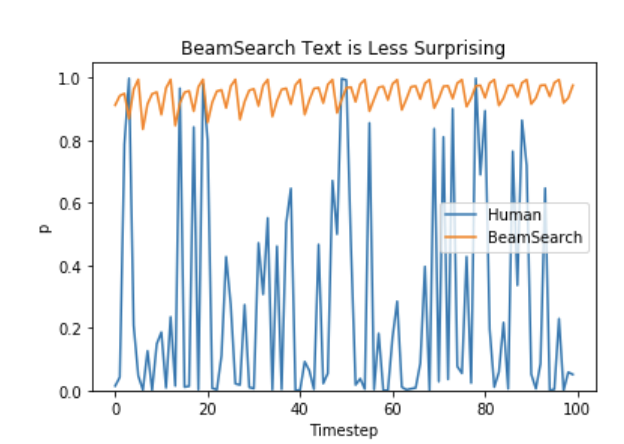
那麼我們就別再沉悶下去,來加入一些隨機性吧 🤪。
抽樣
最基本而言,抽樣是按照條件機率分佈隨機選取下一個詞語 wtw_t:
wt∼P(w∣w1:t−1) w_t \sim P(w|w_{1:t-1})
以下圖示以之前的例子呈現抽樣方式下的語言生成。

顯然,使用抽樣生成語言不再是確定性的。詞語 ("car")(\text{"car"}) 是從條件機率分佈 P(w∣"The")P(w | \text{"The"}) 中抽取,接着再從 P(w∣"The","car")P(w | \text{"The"}, \text{"car"}) 中抽取 ("drives")(\text{"drives"})。
在 transformers 中,我們設定 do_sample=True,並停用 Top-K 抽樣(稍後會詳述),方法是透過 top_k=0。以下會固定隨機種子以作示範。你可以更改 set_seed 參數來取得不同結果,或移除它以允許非確定性結果。
# set seed to reproduce results. Feel free to change the seed though to get different results
from transformers import set_seed
set_seed(42)

# activate sampling and deactivate top_k by setting top_k sampling to 0
sample_output = model.generate(
    **model_inputs,
    max_new_tokens=40,
    do_sample=True,
    top_k=0
)

print("Output:\n" + 100 * '-')
print(tokenizer.decode(sample_output[0], skip_special_tokens=True))
Output:
----------------------------------------------------------------------------------------------------
I enjoy walking with my cute dog for the rest of the day, but this had me staying in an unusual room and not going on nights out with friends (which will always be wondered for a mere minute or so at this point).
有趣!文字看來還可以,但仔細一看便會發現內容不太連貫,聽起來也不像人寫的。這是抽樣詞語序列的一大問題:模型經常生成不連貫的胡言亂語,參見 Ari Holtzman 等人(2019)。
一個技巧是令分佈 P(w∣w1:t−1)P(w|w_{1:t-1}) 更集中(提高高機率詞語的可能性,同時降低低機率詞語的可能性),方法是降低所謂的 temperature,並將其套用於 softmax。
把 temperature 套用到上述例子的示意圖如下。

時間步 t=1t=1 的條件式下一詞分佈會變得集中得多,令詞語 ("car")(\text{"car"}) 幾乎不可能被選中。
看看如何在程式庫中設定 temperature=0.6,令分佈降温:
# set seed to reproduce results. Feel free to change the seed though to get different results
set_seed(42)

# use temperature to decrease the sensitivity to low probability candidates
sample_output = model.generate(
    **model_inputs,
    max_new_tokens=40,
    do_sample=True,
    top_k=0,
    temperature=0.6,
)

print("Output:\n" + 100 * '-')
print(tokenizer.decode(sample_output[0], skip_special_tokens=True))
Output:
----------------------------------------------------------------------------------------------------
I enjoy walking with my cute dog, but I don't like to chew on it. I like to eat it and not chew on it. I like to be able to walk with my dog."

So how did you decide
好,奇怪的 n-gram 少了,輸出也更連貫了一點!使用 temperature 可以降低分佈的隨機性;但當 temperature 趨近 →0\to 0 時,經 temperature 縮放的抽樣會等同貪婪解碼,並遇到同樣的問題。
Top-K 抽樣
Fan 等人(2018)提出一種簡單而強大的抽樣方案,稱為 Top-K 抽樣。在 Top-K 抽樣中,系統會篩選出最可能的 K 個下一詞,並把機率質量重新分配給這些 K 個詞語。GPT2 採用了這種抽樣方案,這是它在故事生成方面取得成功的原因之一。
為了更清楚示範 Top-K 抽樣,我們把上述例子兩個抽樣步驟中使用的詞語範圍,由 3 個擴大至 10 個。

設定 K=6K = 6 後,兩個抽樣步驟的候選池都限制為 6 個詞語。以 Vtop-KV_{\text{top-K}} 表示這 6 個最可能的詞語;在第一步中,它們只涵蓋整體機率質量約三分之二,但在第二步中則幾乎涵蓋全部機率質量。不過,我們看到它成功排除了第二個抽樣步驟中相當奇怪的候選詞 (“not",“the",“small",“told")(\text{``not"}, \text{``the"}, \text{``small"}, \text{``told"})。
看看如何在程式庫中使用 Top-K,方法是設定 top_k=50:
# set seed to reproduce results. Feel free to change the seed though to get different results
set_seed(42)

# set top_k to 50
sample_output = model.generate(
    **model_inputs,
    max_new_tokens=40,
    do_sample=True,
    top_k=50
)

print("Output:\n" + 100 * '-')
print(tokenizer.decode(sample_output[0], skip_special_tokens=True))
Output:
----------------------------------------------------------------------------------------------------
I enjoy walking with my cute dog for the rest of the day, but this time it was hard for me to figure out what to do with it. (One reason I asked this for a few months back is that I had a
不錯!這段文字到目前為止可説是最像人寫的。不過,Top-K 抽樣有一個問題:它不會按下一詞機率分佈 P(w∣w1:t−1)P(w|w_{1:t-1}) 動態調整被篩走的詞語數目。這可能造成問題,因為有些詞語來自非常集中的分佈(上圖右側),另一些則來自較平坦的分佈(上圖左側)。
在步驟 t=1t=1,Top-K 會排除 ("people","big","house","cat")(\text{"people"}, \text{"big"}, \text{"house"}, \text{"cat"}) 這些看來合理的候選詞。另一方面,在步驟 t=2t=2,方法卻把不太合適的詞語 ("down","a")(\text{"down"}, \text{"a"}) 納入候選池。因此,把候選池限制為固定數目的 K 個詞語,可能令模型在分佈集中的情況下生成胡言亂語,也會限制模型在分佈平坦時的創意。這個想法促使 Ari Holtzman 等人(2019)提出 Top-p 或核抽樣。
Top-p(核)抽樣
Top-p 抽樣不會只從最可能的 K 個詞語中抽樣,而會從最小的一組詞語中選取;這組詞語的累積機率會超過指定機率 p。之後,機率質量會重新分配到這組詞語之間。這樣一來,詞語集合的大小(亦即集合中的詞語數目)便可按下一詞的機率分佈動態增減。好吧,剛才説得太囉嗦了,來看圖吧。

設定 p=0.92p=0.92 後,Top-p 抽樣會選取最少數目的詞語,令它們合計超過機率質量的 p=92%p=92\%,並以 Vtop-pV_{\text{top-p}} 表示。在第一個例子中,這包括最可能的 9 個詞語;第二個例子只需選取最可能的 3 個詞語,合計機率便會超過 92%。其實相當簡單!可以看到,當下一個詞較難預測時,例如 P(w∣"The”)P(w | \text{"The''}),它會保留較多不同詞語;當下一個詞較容易預測時,例如 P(w∣"The","car")P(w | \text{"The"}, \text{"car"}),則只保留少數詞語。
好,現在到 transformers 試試!啟用 Top-p 抽樣的方法是設定 0 < top_p < 1:
# set seed to reproduce results. Feel free to change the seed though to get different results
set_seed(42)

# set top_k to 50
sample_output = model.generate(
    **model_inputs,
    max_new_tokens=40,
    do_sample=True,
    top_p=0.92,
    top_k=0
)

print("Output:\n" + 100 * '-')
print(tokenizer.decode(sample_output[0], skip_special_tokens=True))
Output:
----------------------------------------------------------------------------------------------------
I enjoy walking with my cute dog for the rest of the day, but this had me staying in an unusual room and not going on nights out with friends (which will always be my yearning for such a spacious screen on my desk
不錯,聽起來像是人寫的。嗯,也許還未完全是。
理論上,Top-p 似乎比 Top-K 更優雅,但兩種方法在實際應用中都有效。Top-p 亦可與 Top-K 結合使用,在作出動態選擇的同時,避免選到排名極低的詞語。
最後,如要取得多個彼此獨立抽樣的輸出,我們可以再次設定參數 num_return_sequences > 1:
# set seed to reproduce results. Feel free to change the seed though to get different results
set_seed(42)

# set top_k = 50 and set top_p = 0.95 and num_return_sequences = 3
sample_outputs = model.generate(
    **model_inputs,
    max_new_tokens=40,
    do_sample=True,
    top_k=50,
    top_p=0.95,
    num_return_sequences=3,
)

print("Output:\n" + 100 * '-')
for i, sample_output in enumerate(sample_outputs):
  print("{}: {}".format(i, tokenizer.decode(sample_output, skip_special_tokens=True)))
Output:
----------------------------------------------------------------------------------------------------
0: I enjoy walking with my cute dog for the rest of the day, but this time it was hard for me to figure out what to do with it. When I finally looked at this for a few moments, I immediately thought, "
1: I enjoy walking with my cute dog. The only time I felt like walking was when I was working, so it was awesome for me. I didn't want to walk for days. I am really curious how she can walk with me
2: I enjoy walking with my cute dog (Chama-I-I-I-I-I), and I really enjoy running. I play in a little game I play with my brother in which I take pictures of our houses.
太好了,現在你應該已掌握所有工具,可以用 transformers 讓模型寫故事了!
結語
作為臨時解碼方法,top-p 和 top-K 抽樣在開放式語言生成中,似乎比傳統的貪婪搜尋和束搜尋產生更流暢的文字。有證據顯示,貪婪搜尋和束搜尋表面上的缺點(主要是生成重複詞語序列),其實源自模型(尤其是模型的訓練方式),而非解碼方法,參見 Welleck 等人(2019)。此外,正如 Welleck 等人(2020)所示,top-K 和 top-p 抽樣看來同樣會生成重複的詞語序列。
在 Welleck 等人(2019)中,作者指出,根據人類評估,在調整模型訓練目標後,束搜尋生成的文字可以比 Top-p 抽樣更流暢。
開放式語言生成是快速發展的研究領域;而且一如許多情況,這裏沒有一種方法適用所有場景,因此我們要按自己的具體用途,看看哪種方法效果最好。
幸好,你可以在 transfomers 🤗 試用所有不同的解碼方法;此處列出了可用方法。
感謝所有曾為本文作出貢獻的人:Alexander Rush、Julien Chaumand、Thomas Wolf、Victor Sanh、Sam Shleifer、Clément Delangue、Yacine Jernite、Oliver Åstrand 和 John de Wasseige。
附錄
generate 已發展成高度可組合的方法,可以透過旗標以多種方式操控生成文字;本文未有涵蓋所有方向。以下列出幾個有用頁面供你參考:
如果你覺得瀏覽我們的文件很困難,無法輕易找到所需內容,歡迎在這個 GitHub issue留言。你的意見對我們確定未來方向非常重要!🤗
來源:Hugging Face Blog · huggingface.co