Sloth:以 Gemma、Ollama 和 GitHub Copilot 建構的本機 AI 工具,可整理檔案及摘要對話
Sloth: a lazy local AI tool that tidies files and summarizes chats, built with Gemma, Ollama and GitHub Copilot
Sloth 是以 Gemma 3 (1B)、Ollama 和 GitHub Copilot 建構的本機命令列工具,可整理檔案及摘要對話。整理功能會先預覽分類結果,只有使用 `--apply` 才會移動檔案,且不會覆寫現有檔案;摘要功能會輸出兩行內容。工具在電腦本機執行,毋須雲端服務或 API key。
This is a submission for the Hacktoberfest Open-Source AI Challenge Week 3: Slow and Steady
What I Built
I built Sloth, a small command-line tool that does two things for me so I don't have to.
The first one is sloth tidy <folder>. It takes a messy folder, like Downloads, and sorts the files into:
- Documents
- Images
- Videos
- Audio
- Archives
- Code
- Other
It shows me what it plans to do first. It only actually moves the files when I use --apply, and it never overwrites an existing file.
The second one is sloth digest <file>. It takes an exported chat or notes file and gives me a short two-line summary: what the conversation is about and whether there is a decision, task, or deadline.
Both commands use Gemma 3 (1B) through Ollama, running directly on my laptop. So there is no cloud service, no API key and no extra cost. It is basically a little AI tool running on my own computer to help me be lazy.
Demo
Here is some real output from my machine:
$ node src/index.js tidy /tmp/messy
app.js -> Code/app.js
budget.xyz -> Code/budget.xyz
holiday-selfie -> Documents/holiday-selfie
lecture-recording -> Videos/lecture-recording
notes.txt -> Documents/notes.txt
photo.jpg -> Images/photo.jpg
report.pdf -> Documents/report.pdf
song.mp3 -> Audio/song.mp3

$ node src/index.js digest chat.txt
Amina and Joe will meet at 3pm, with the report deadline being Friday noon.
No action needed
And honestly, not all of this output is correct. I'll explain that below.
Code
 davidnize
/
sloth-cli
davidnize
/
sloth-cli
A lazy local AI command-line tool: sort files and summarize chats with Gemma and Ollama. No cloud, no API keys.
sloth-cli
A lazy local AI command-line tool powered by Gemma and Ollama. It does small chores for you, entirely on your own machine: no cloud, no API keys, no cost.
Setup
- Install Ollama and keep it running.
- Pull the model:
ollama pull gemma3:1b - Install Node.js 18 or newer, clone this repo, and run commands from its folder.
Usage
node src/index.js <command>
Commands:
tidy <folder> [--apply]digest <file>
tidy
Sorts the files in a folder into category subfolders (Documents, Images, Videos, Audio, Archives, Code, Other). The local model picks each category, with a fallback to the file extension if its answer is invalid.
-
node src/index.js tidy <folder>is a dry run and only prints the planned moves. -
node src/index.js tidy <folder> --applycreates the folders and moves the files. - Existing files are never overwritten. The model runs with temperature 0 and a fixed seed, so a dry run and…
How I Built It
The AI
I used Gemma 3 (1B) through Ollama. The tool talks to Ollama's /api/generate endpoint running on localhost. The project itself is just plain Node.js with no dependencies.
For tidy, the AI looks at each file and chooses one category from a fixed list. If the AI gives me something that isn't one of those categories, or if Ollama isn't available, the program falls back to using the file extension.
For digest, I send the last 6000 characters of the file to Gemma because, for chats especially, the most recent messages are usually the most useful. Then I take the first two non-empty lines from the response.

How GitHub Copilot fits in
I wrote very little of the actual code myself. Instead, I created GitHub issues and assigned them to GitHub Copilot's coding agent.
This is what I did:
- Issue #1 — CLI skeleton and the Ollama helper → PR #2
-
Issue #3 —
tidycommand → PR #4 - Issue #6 — bug I found while testing → PR #7
-
Issue #8 —
digestcommand → PR #9
I still tested every pull request myself before merging it. I wasn't just letting Copilot write everything and hoping it worked.
The Bug
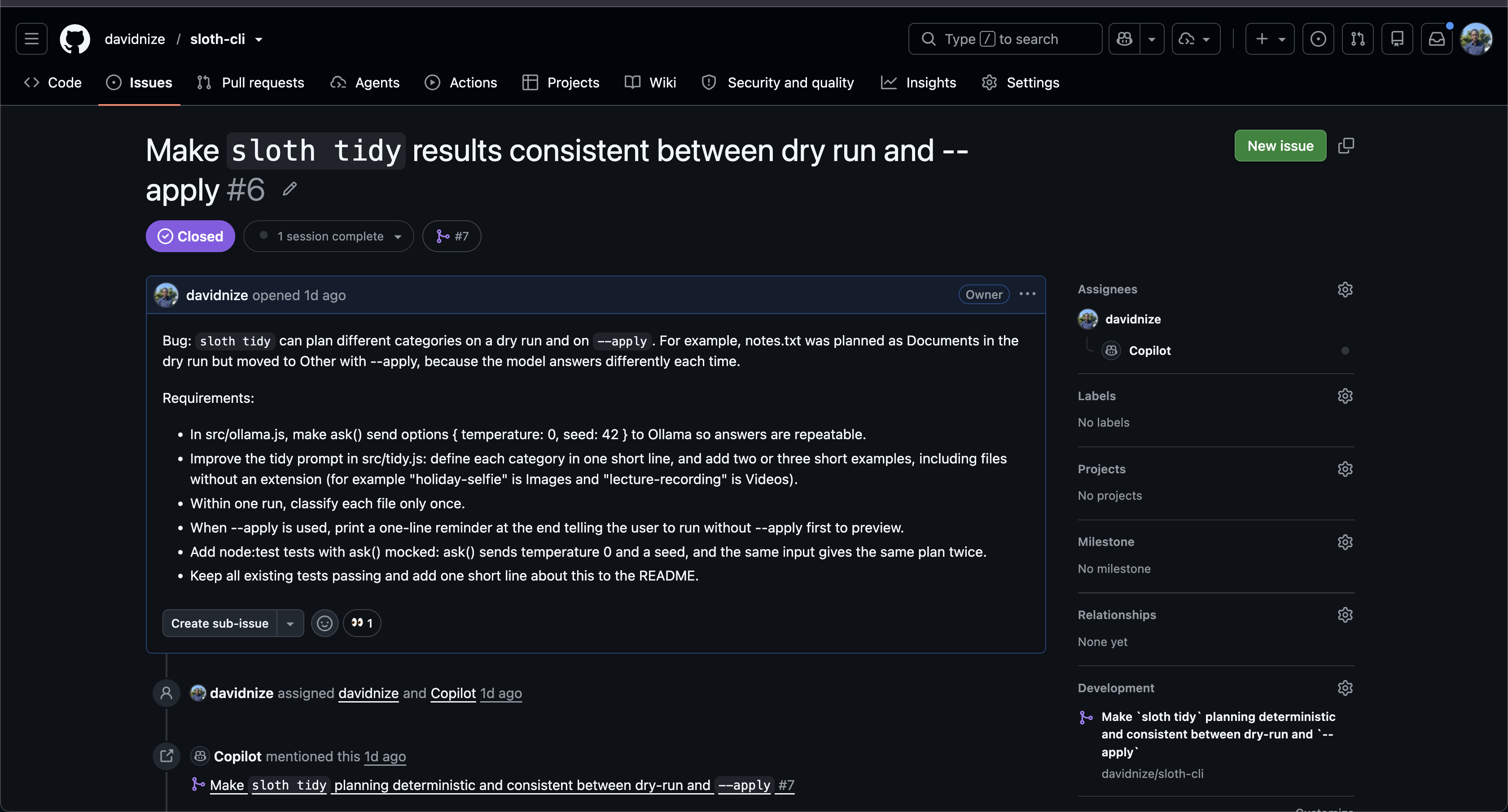
While testing tidy, I found something I didn't like. I ran it as a preview first, and notes.txt was supposed to go into Documents. Then I ran it again with --apply, and the AI decided to put the same file in Other. The model was giving a different answer each time, which meant the preview wasn't actually a promise of what was going to happen.
So I opened Issue #6 and had Copilot fix it by making the model deterministic, using a temperature of 0 and a fixed seed. After that, the preview and the actual run gave me the same plan.

Something Copilot Got Wrong
There was another thing I caught while reviewing the fix. Copilot originally put temperature and seed at the top level of the Ollama request, but Ollama expects those settings inside an options object. So they were basically being ignored.
The funny part is that Copilot's own test still passed because the test was checking the wrong place too. I caught this while reviewing the pull request, commented on it, and Copilot fixed it in another commit.
That was one of the more interesting parts of building this because it reminded me that even when an AI writes the code, I still need to understand what the code is actually doing.

When the Credits Ran Out
While working on the digest pull request, Copilot ran out of its monthly credits. It couldn't fix an old test that was still expecting digest to say "not implemented yet", and a Copilot review request also failed because of the quota. So I fixed that test myself.
I also added a GitHub Actions workflow myself so that every push and pull request runs the full test suite.
I had also planned to build a third command called cards, but I decided not to force it into the project just because I had planned it. I'd rather leave it out than ship something half-finished.


Why Does Open Innovation Matter?
For me, the biggest reason is that the AI actually stays on my computer. tidy needs to see my file names and digest needs to read my chats or notes. I don't really want to send those things to some random online API just to organize them. With Ollama and Gemma, they stay local.
It also means:
- No API key
- No API bill
- No internet connection needed once the model is downloaded
- I can control the model settings myself
- I can change the model without changing the whole project
The model name is basically in one place, so trying a bigger Gemma should be as simple as changing that.
Of course, there is a downside. The 1B model isn't that good. You can see that from my own output. It put holiday-selfie into Documents and budget.xyz into Code. The digest command also said "No action needed" even though the chat clearly had tasks in it.
So I'm not going to pretend this is some perfect AI assistant. A larger Gemma might do much better, but I haven't tested that yet.
My Agent Session
I didn't use DevRelay for this. The whole process is visible in the GitHub repository through the issues and pull requests. You can see Copilot's plans, commits, session information and my review comments.
- Issue #1 / PR #2: https://github.com/davidnize/sloth-cli/pull/2
-
tidy: https://github.com/davidnize/sloth-cli/pull/4 - Bug fix: https://github.com/davidnize/sloth-cli/pull/7
-
digest: https://github.com/davidnize/sloth-cli/pull/9
The Lazy Payoff
I haven't tested Sloth enough to say something like "it saved me 10 hours." I only tested it with sample files and a short sample chat, so I don't want to make up a number.
What I do like is the preview-first approach. I can look at what Sloth plans to do, make sure it looks right, and then use --apply. So instead of manually sorting everything myself, I just check the plan once and let Sloth do the boring part.
I wanted to be a little lazier.
Prize Categories
Best Use of GitHub Copilot
Most of the project was built by creating issues and assigning them to Copilot's coding agent. I also included the parts where Copilot wasn't perfect: the bug it fixed, the mistake I caught in its fix, and the point where it ran out of credits and I had to take over. I think that shows the actual process better than pretending the AI wrote perfect code from the beginning.
I also added GitHub Actions myself so the tests run automatically on every push and pull request.

Best Use of Gemma
Gemma 3 (1B) is the only AI model in the project. It runs locally through Ollama and is used for both tidy and digest. Nothing is sent to a cloud AI API.
來源:DEV Community · dev.to