Google 發佈開放大語言模型 Gemma,Hugging Face 提供整合支援
Welcome Gemma - Google’s new open LLM
Google 發佈 Gemma 開放大語言模型系列,提供 2B、7B 兩種規模,各有基礎版與指令微調版,所有版本的上下文窗口為 8K tokens。Hugging Face 將模型上架 Hub,整合 Transformers 4.38、Google Cloud 和 Inference Endpoints,並提供以 TRL 微調的示例。
文中將 Gemma 2B、7B 基礎模型與其他開放模型的 LLM Leaderboard 成績並列,呈現其不同參數規模下的相對表現。
本文發布兩個月後,Gemma 模型推出更新版本,請參閲這個合集中的最新版本。
Google 今天發布了全新一代最先進的開放 LLM 模型系列 Gemma!Google 再次展現對開放原始碼 AI 的承諾,令人鼓舞;我們亦很高興以 Hugging Face 生態系統的全面整合,全力支援這次發布。
Gemma 有兩種規模:供消費級 GPU 和 TPU 高效部署及開發的 7B 參數版本,以及供 CPU 和裝置端應用程式使用的 2B 版本。兩種規模均提供基礎版和指令微調版。
我們與 Google 合作,確保 Gemma 能最佳整合至 Hugging Face 生態系統。你可以在 Hub 找到 4 個開放取用模型(2 個基礎模型和 2 個微調模型)。這次推出的功能及整合包括:
- Hub 上的模型,附有模型卡和授權條款
- 🤗 Transformers 整合
- Google Cloud 整合
- Inference Endpoints 整合
- 使用 🤗 TRL 在單一 GPU 上微調 Gemma 的範例
目錄
甚麼是 Gemma?
Gemma 是 Google 推出的全新 LLM 模型系列,共有 4 個模型,建基於 Gemini。系列有兩種規模:2B 和 7B 參數,各自提供基礎版(預訓練)及指令微調版。所有版本都能在多種消費級硬件上執行,即使不經量化亦可,並支援 8K tokens 的上下文長度:
- gemma-7b:7B 基礎模型。
- gemma-7b-it:7B 基礎模型的指令微調版本。
- gemma-2b:2B 基礎模型。
- gemma-2b-it:2B 基礎模型的指令微調版本。
原版發布一個月後,Google 推出了指令模型的新版本。此版本在程式編寫能力、事實準確度、遵循指令能力和多輪對話質素方面均有提升,也較少會以「Sure,」作開頭。

那麼,Gemma 模型表現如何?以下概述基礎模型,並在 LLM Leaderboard 上與其他開放模型比較(分數愈高愈好):
| 模型 | 授權條款 | 可否商業使用? | 預訓練規模 [tokens] | Leaderboard 分數 ⬇️ |
|---|---|---|---|---|
| LLama 2 70B Chat(參考模型) | Llama 2 授權條款 | ✅ | 2T | 67.87 |
| Gemma-7B | Gemma 授權條款 | ✅ | 6T | 63.75 |
| DeciLM-7B | Apache 2.0 | ✅ | 未知 | 61.55 |
| PHI-2(2.7B) | MIT | ✅ | 1.4T | 61.33 |
| Mistral-7B-v0.1 | Apache 2.0 | ✅ | 未知 | 60.97 |
| Llama 2 7B | Llama 2 授權條款 | ✅ | 2T | 54.32 |
| Gemma 2B | Gemma 授權條款 | ✅ | 2T | 46.51 |
Gemma 7B 是非常出色的模型,表現可媲美同屬 7B 參數級別的最佳模型,包括 Mistral 7B。以規模而言,Gemma 2B 也很有意思;不過在排行榜上的分數不及同等規模中能力較強的模型,例如 Phi 2。我們期待社羣分享實際使用心得!
請記住,LLM Leaderboard 特別適合評估預訓練模型質素,較不適合評估聊天模型。我們建議聊天模型亦使用 MT Bench、EQ Bench 和 lmsys Arena 等其他基準測試!
提示格式
基礎模型沒有特定提示格式。與其他基礎模型一樣,可用來延續輸入序列,生成合理的後續內容,或進行零樣本/少樣本推論。它們亦很適合作為基礎,針對自己的用途進行微調。指令版本則採用非常簡單的對話結構:
<start_of_turn>user
knock knock<end_of_turn>
<start_of_turn>model
who is there<end_of_turn>
<start_of_turn>user
LaMDA<end_of_turn>
<start_of_turn>model
LaMDA who?<end_of_turn>
要有效使用,必須準確重現此格式。稍後我們會展示如何使用 transformers 提供的聊天模板,輕鬆重現指令提示。
探索尚待了解的範疇
技術報告説明瞭基礎模型的訓練和評估流程,但未有詳細交代數據集的組成和預處理方法。我們知道模型使用多種來源的數據訓練,主要是網頁文件、程式碼和數學文本。數據經過篩選,以移除兒童性虐待材料(CSAM)及個人身份資料(PII),亦進行授權檢查。
同樣,Gemma 指令模型的微調數據集,以及 SFT 和 RLHF 相關超參數,亦未有公佈詳情。
示範
你可以在 Hugging Chat 與 Gemma 指令模型對話!請查看此連結:https://huggingface.co/chat/models/google/gemma-1.1-7b-it
使用 🤗 Transformers
隨着 Transformers 4.38 版本推出,你可以使用 Gemma,並運用 Hugging Face 生態系統中的各種工具,例如:
- 訓練和推論指令碼及範例
- 安全檔案格式(
safetensors) - 與 bitsandbytes(4-bit 量化)、PEFT(參數高效微調)及 Flash Attention 2 等工具整合
- 用於執行模型生成的工具及輔助函式
- 匯出模型以供部署的機制
此外,Gemma 模型支援搭配 CUDA graphs 使用 torch.compile(),令推論速度提升約 4 倍!
如要透過 transformers 使用 Gemma 模型,請確保安裝近期版本的 transformers:
pip install --upgrade transformers
以下程式片段示範如何使用 transformers 執行 gemma-7b-it。大約需要 18 GB RAM,包括 3090 或 4090 等消費級 GPU。
from transformers import pipeline
import torch

pipe = pipeline(
    "text-generation",
    model="google/gemma-7b-it",
    model_kwargs={"torch_dtype": torch.bfloat16},
    device="cuda",
)

messages = [
    {"role": "user", "content": "Who are you? Please, answer in pirate-speak."},
]
outputs = pipe(
    messages,
    max_new_tokens=256,
    do_sample=True,
    temperature=0.7,
    top_k=50,
    top_p=0.95
)
assistant_response = outputs[0]["generated_text"][-1]["content"]
print(assistant_response)
Avast me, me hearty. I am a pirate of the high seas, ready to pillage and plunder. Prepare for a tale of adventure and booty!
我們使用 bfloat16,因為這是參考精度,也是所有評估採用的精度。在你的硬件上使用 float16 可能會更快。
你亦可自動量化模型,以 8-bit 或甚至 4-bit 模式載入。4-bit 載入約需 9 GB 記憶體即可執行,適用於許多消費級顯示卡及 Google Colab 上的所有 GPU。以下示範如何以 4-bit 載入生成 pipeline:
pipeline = pipeline(
    "text-generation",
    model=model,
    model_kwargs={
        "torch_dtype": torch.float16,
        "quantization_config": {"load_in_4bit": True}
    },
)
如需更多透過 transformers 使用模型的詳情,請參閲模型卡。
JAX 權重
如上所述,所有 Gemma 模型版本均可搭配 PyTorch 使用,也可搭配 JAX/Flax。若要載入 Flax 權重,須使用儲存庫中的 flax revision,如下所示:
import jax.numpy as jnp
from transformers import AutoTokenizer, FlaxGemmaForCausalLM

model_id = "google/gemma-2b"

tokenizer = AutoTokenizer.from_pretrained(model_id)
tokenizer.padding_side = "left"

model, params = FlaxGemmaForCausalLM.from_pretrained(
        model_id,
        dtype=jnp.bfloat16,
        revision="flax",
        _do_init=False,
)

inputs = tokenizer("Valencia and Málaga are", return_tensors="np", padding=True)
output = model.generate(**inputs, params=params, max_new_tokens=20, do_sample=False)
output_text = tokenizer.batch_decode(output.sequences, skip_special_tokens=True)
['Valencia and Málaga are two of the most popular tourist destinations in Spain. Both cities boast a rich history, vibrant culture,']
如要全面實作並瞭解如何在 Colab TPU 上平行執行 JAX 推論,請查看這份筆記本!
整合 Google Cloud
你可以透過 Vertex AI 或 Google Kubernetes Engine(GKE)在 Google Cloud 部署及訓練 Gemma,並使用 Text Generation Inference 和 Transformers。
如要從 Hugging Face 部署 Gemma 模型,請前往 模型頁面 ,然後按 Deploy -> Google Cloud。系統會帶你前往 Google Cloud Console,並可在 Vertex AI 或 GKE 透過 1 次點擊部署 Gemma。Gemma 在 Google Cloud 上由 Text Generation Inference 提供支援,是我們與 Google Cloud合作夥伴關係中的首項整合。
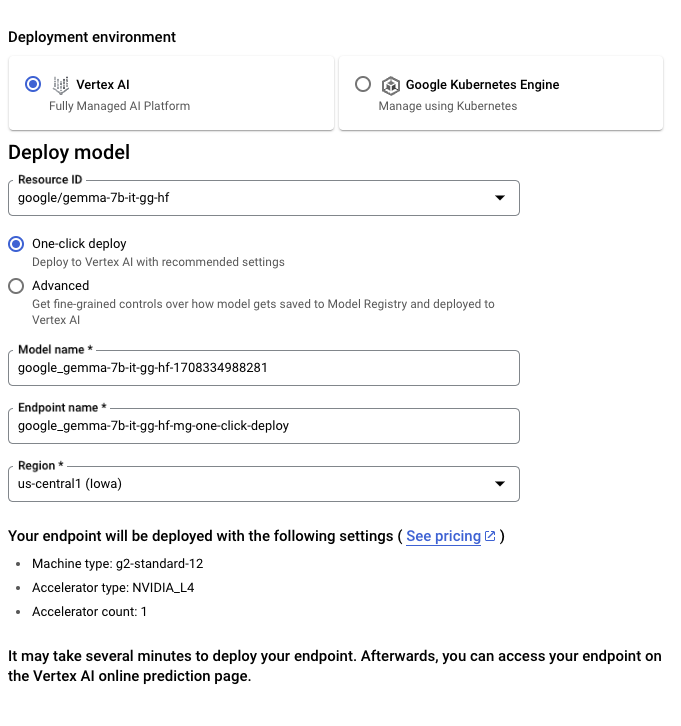
你亦可以透過 Vertex AI Model Garden 直接使用 Gemma。
如要微調 Hugging Face 上的 Gemma 模型,請前往 模型頁面 ,然後按 Train -> Google Cloud。系統會帶你前往 Google Cloud Console,並可在其中使用筆記本於 Vertex AI 或 GKE 微調 Gemma。
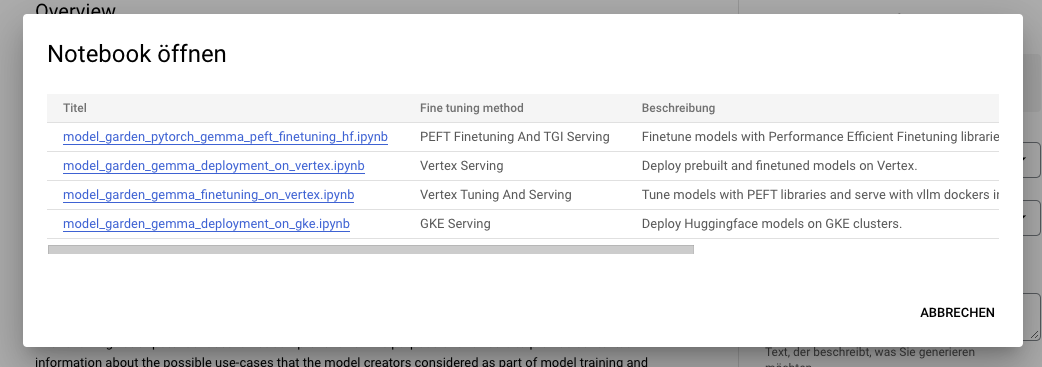
這些整合是我們與 Google 建立合作夥伴關係後共同推出的首批服務。更多內容即將推出,敬請期待!
整合 Inference Endpoints
你可以在 Hugging Face 的 Inference Endpoints 部署 Gemma,後端採用 Text Generation Inference。Text Generation Inference 是 Hugging Face 開發、可用於正式環境的推論容器,讓部署大型語言模型更簡單。它具備連續批次處理、token 串流、在多張 GPU 上快速推論的張量平行化,以及適用於正式環境的記錄和追蹤等功能。
如要部署 Gemma 模型,請前往 模型頁面 ,然後按一下 Deploy -> Inference Endpoints 小工具。如要了解更多,可參閲先前網誌文章使用 Hugging Face Inference Endpoints 部署 LLM。Inference Endpoints 透過 Text Generation Inference 支援 Messages API,讓你只需更改 URL,便可由其他閉源模型切換至開放模型。
from openai import OpenAI

# initialize the client but point it to TGI
client = OpenAI(
    base_url="<ENDPOINT_URL>" + "/v1/",  # replace with your endpoint url
    api_key="<HF_API_TOKEN>",  # replace with your token
)
chat_completion = client.chat.completions.create(
    model="tgi",
    messages=[
        {"role": "user", "content": "Why is open-source software important?"},
    ],
    stream=True,
    max_tokens=500
)

# iterate and print stream
for message in chat_completion:
    print(message.choices[0].delta.content, end="")
使用 🤗 TRL 微調
訓練 LLM 在技術和運算方面都可能充滿挑戰。本節會介紹 Hugging Face 生態系統中可用的工具,讓你在消費級 GPU 上有效率地訓練 Gemma。
以下提供一個範例指令,示範如何使用 OpenAssistant 的聊天數據集微調 Gemma。我們採用 4-bit 量化及 QLoRA 節省記憶體,以便將目標設定為所有 attention 區塊中的線性層。
首先,安裝 🤗 TRL nightly 版本,並複製儲存庫以取得訓練指令碼:
pip install -U transformers trl peft bitsandbytes
git clone https://github.com/huggingface/trl
cd trl
然後執行指令碼:
accelerate launch --config_file examples/accelerate_configs/multi_gpu.yaml --num_processes=1 \
    trl/scripts/sft.py \
    --model_name google/gemma-7b \
    --dataset_name OpenAssistant/oasst_top1_2023-08-25 \
    --per_device_train_batch_size 2 \
    --gradient_accumulation_steps 1 \
    --learning_rate 2e-4 \
    --save_steps 20_000 \
    --use_peft \
    --lora_r 16 --lora_alpha 32 \
    --lora_target_modules q_proj k_proj v_proj o_proj \
    --load_in_4bit \
    --output_dir gemma-finetuned-openassistant
在單張 A10G 上訓練約需 9 小時;你亦可把 --num_processes 調整為可用 GPU 數量,輕鬆平行執行。
其他資源
- Hub 上的模型
- 開放 LLM 排行榜
- Hugging Chat 對話示範
- Gemma 官方網誌
- Gemma 產品頁面
- Vertex AI Model Garden 連結
- Google 筆記本
鳴謝
要在生態系統中發布這些模型並提供支援和評估,仰賴許多社羣成員的貢獻,包括負責 LLM 評估的 Clémentine 和 Eleuther Evaluation Harness;負責支援 Text Generation Inference 的 Olivier 和 David ;負責開發 Hugging Face 新存取控制功能的 Simon;負責把 Gemma 整合至 transformers 的 Arthur、Younes 和 Sanchit ;負責把 Gemma 整合至 optimum-nvidia(即將推出)的 Morgan;以及讓 Gemma 能在 Hugging Chat 使用的 Nathan、Victor 和 Mishig。
另感謝 Google 團隊發布 Gemma,並讓開放原始碼 AI 社羣能夠使用!
來源:Hugging Face Blog · huggingface.co