Meta 發佈 Llama 2,12 個模型上架 Hugging Face Hub
Llama 2 is here - get it on Hugging Face
Meta 發佈 Llama 2 開放存取大語言模型系列,涵蓋 7B、13B 和 70B 參數規模,採用允許商業用途的社羣授權。Hugging Face Hub 上架 12 個模型,並整合 Transformers、Text Generation Inference 和 Inference Endpoints。
文中把 Llama 2 的商用授權與 Hugging Face 上的推理、部署和 QLoRA 微調方法連在一起,呈現從取得模型到接入開發流程的實用路徑。
簡介
Meta 今天發布 Llama 2 系列最新開放存取大型語言模型,我們很高興在 Hugging Face 全面整合並支援這次發布。Llama 2 採用非常寬鬆的社羣授權,並可商業使用。程式碼、預訓練模型和微調模型今天一併發布 🔥
我們與 Meta 合作,確保模型能順利整合至 Hugging Face 生態系統。Hub 上提供 12 個開放存取模型:3 個基礎模型和 3 個以 Meta 原始檢查點為基礎的微調模型,以及相應的 transformers 模型。這次發布的功能和整合包括:
- Hub 上的模型,並附有模型卡和授權資訊。
- Transformers 整合
- 提供範例,示範如何使用單張 GPU 為較小型模型變體進行微調
- 整合 Text Generation Inference,以高速、高效率方式執行可用於生產環境的推論
- 整合 Inference Endpoints
目錄
為何選擇 Llama 2?
Llama 2 系列包括預訓練和微調 LLM,規模涵蓋 7B 至 70B 參數(7B、13B、70B)。相較於 Llama 1,預訓練模型有顯著改進,包括使用多 40% 的 token 訓練、上下文長度大幅延長至 4k tokens 🤯,以及讓 70B 模型推論更快的分組查詢注意力🔥!
不過,這次發布最令人振奮的是微調模型(Llama 2-Chat):模型使用人類回饋強化學習(RLHF)進行對話最佳化。在各類有用性和安全基準測試中,Llama 2-Chat 的表現勝過大部分開源模型;根據人類評估,其效能亦可媲美 ChatGPT。你可以在此處閲讀論文。
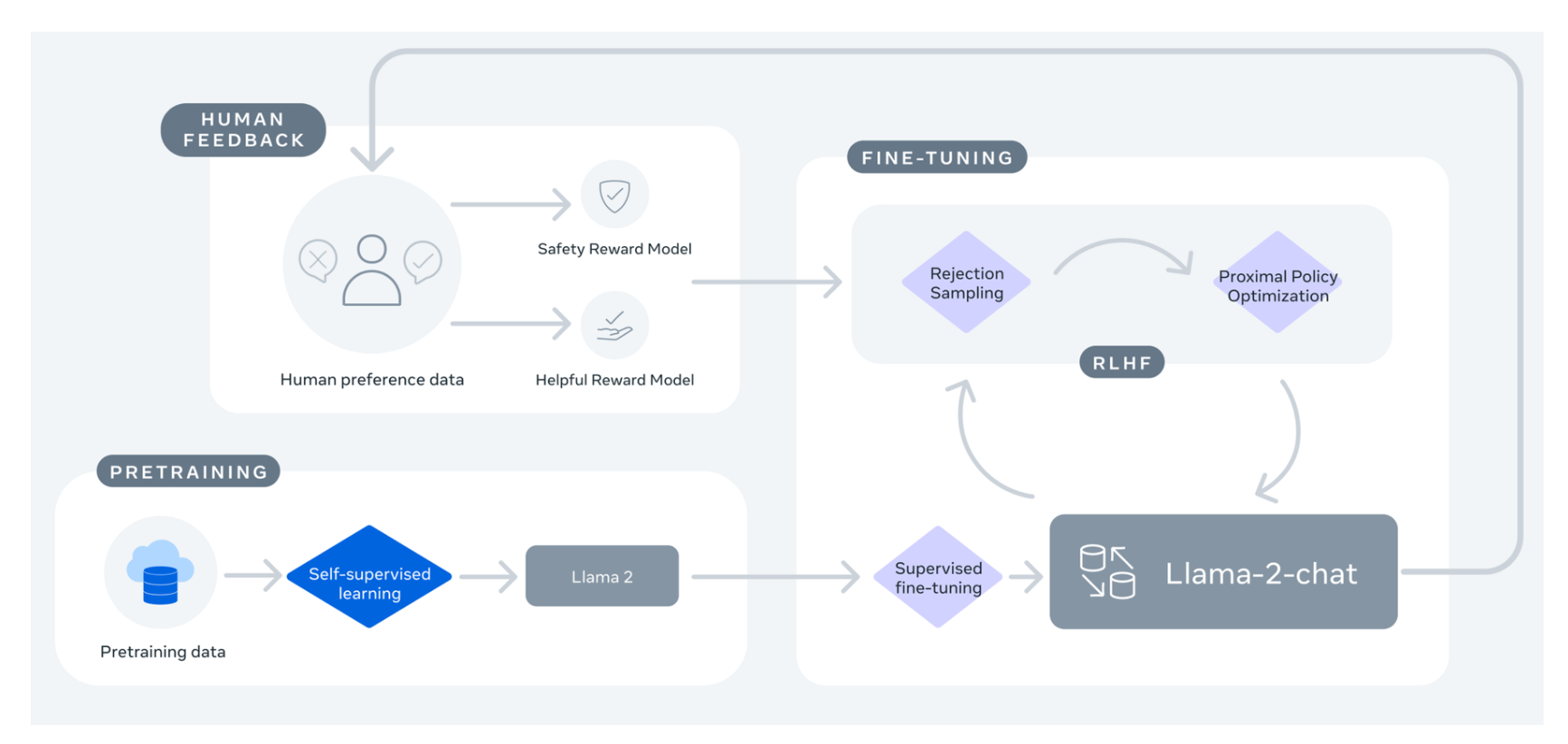
如果你一直期待閉源聊天機器人的開源替代方案,Llama 2-Chat 很可能是你目前的最佳選擇!
| 模型 | 授權 | 可商業使用? | 預訓練長度 [tokens] | 排行榜分數 |
|---|---|---|---|---|
| Falcon-7B | Apache 2.0 | ✅ | 1,500B | 44.17 |
| MPT-7B | Apache 2.0 | ✅ | 1,000B | 47.24 |
| Llama-7B | Llama 授權 | ❌ | 1,000B | 45.65 |
| Llama-2-7B | Llama 2 授權 | ✅ | 2,000B | 50.97 |
| Llama-33B | Llama 授權 | ❌ | 1,500B | - |
| Llama-2-13B | Llama 2 授權 | ✅ | 2,000B | 55.69 |
| mpt-30B | Apache 2.0 | ✅ | 1,000B | 52.77 |
| Falcon-40B | Apache 2.0 | ✅ | 1,000B | 58.07 |
| Llama-65B | Llama 授權 | ❌ | 1,500B | 61.19 |
| Llama-2-70B | Llama 2 授權 | ✅ | 2,000B | 67.87 |
| Llama-2-70B-chat | Llama 2 授權 | ✅ | 2,000B | 62.4 |
注意:下表的效能分數已根據 2023 年 11 月引入的新方法更新,該方法新增了基準測試。詳情請參閲這篇文章。
示範
你可以在 這個 Space 或下方嵌入的 Playground,輕鬆試用 13B Llama 2 模型:
如要了解此示範的運作方式,請繼續閲讀下文,瞭解如何執行 Llama 2 模型推論。
推論
本節會介紹執行 Llama 2 模型推論的不同方法。使用這些模型前,請先向官方 Meta Llama 2儲存庫申請其中一個模型的存取權。
注意:請確保亦已填寫 Meta 官方表格。填妥兩份表格數小時後,用戶便會獲得儲存庫存取權。
使用 transformers
使用 transformers 4.31 版後,你已可使用 Llama 2,並運用 HF 生態系統中的所有工具,例如:
- 訓練和推論指令碼及範例
- 安全檔案格式(
safetensors) - 整合 bitsandbytes(4-bit 量化)和 PEFT(參數高效微調)等工具
- 用於執行模型生成的工具和輔助功能
- 匯出模型以供部署的機制
請確保使用最新版本的 transformers,並已登入 Hugging Face 帳戶。
pip install transformers
huggingface-cli login
以下程式碼片段示範如何使用 transformers 執行推論。只要選擇 GPU 執行階段,就能在 Colab 免費層執行。
from transformers import AutoTokenizer
import transformers
import torch

model = "meta-llama/Llama-2-7b-chat-hf"

tokenizer = AutoTokenizer.from_pretrained(model)
pipeline = transformers.pipeline(
    "text-generation",
    model=model,
    torch_dtype=torch.float16,
    device_map="auto",
)

sequences = pipeline(
    'I liked "Breaking Bad" and "Band of Brothers". Do you have any recommendations of other shows I might like?\n',
    do_sample=True,
    top_k=10,
    num_return_sequences=1,
    eos_token_id=tokenizer.eos_token_id,
    max_length=200,
)
for seq in sequences:
    print(f"Result: {seq['generated_text']}")
Result: I liked "Breaking Bad" and "Band of Brothers". Do you have any recommendations of other shows I might like?
Answer:
Of course! If you enjoyed "Breaking Bad" and "Band of Brothers," here are some other TV shows you might enjoy:
1. "The Sopranos" - This HBO series is a crime drama that explores the life of a New Jersey mob boss, Tony Soprano, as he navigates the criminal underworld and deals with personal and family issues.
2. "The Wire" - This HBO series is a gritty and realistic portrayal of the drug trade in Baltimore, exploring the impact of drugs on individuals, communities, and the criminal justice system.
3. "Mad Men" - Set in the 1960s, this AMC series follows the lives of advertising executives on Madison Avenue, expl
雖然模型的上下文長度只有 4k tokens,你仍可使用 transformers 支援的技術,例如旋轉位置嵌入縮放(推文),進一步延長上下文!
使用 text-generation-inference 和 Inference Endpoints
Text Generation Inference 是 Hugging Face 開發、可用於生產環境的推論容器,讓大型語言模型更容易部署。它具備連續批次處理、token 串流、多 GPU 快速推論所需的張量平行處理,以及適用於生產環境的日誌和追蹤功能。
你可以在自己的基礎設施上試用 Text Generation Inference,或使用 Hugging Face 的Inference Endpoints。要部署 Llama 2 模型,請前往模型頁面,再按下Deploy -> Inference Endpoints 小工具。
- 對 7B 模型,我們建議選擇「GPU [medium] - 1x Nvidia A10G」。
- 對 13B 模型,我們建議選擇「GPU [xlarge] - 1x Nvidia A100」。
- 對 70B 模型,我們建議啟用
bitsandbytes量化,並選擇「GPU [2xlarge] - 2x Nvidia A100」;或選擇「GPU [4xlarge] - 4x Nvidia A100」
注意:如要使用 A100,你可能需要透過電郵向 api-enterprise@huggingface.co 申請提高配額
你可以在我們的網誌中瞭解如何使用 Hugging Face Inference Endpoints 部署 LLM。該網誌亦介紹支援的超參數,以及如何使用 Python 和 Javascript 串流回應。
使用 PEFT 微調
訓練 LLM 在技術和運算資源方面都可能充滿挑戰。本節會介紹 Hugging Face 生態系統中可用的工具,説明如何在簡單硬件上高效訓練 Llama 2,並示範如何在單張 NVIDIA T4(16GB - Google Colab)上微調 Llama 2 的 7B 版本。詳情請參閲《讓 LLM 更易普及》網誌文章。
我們建立了一個指令碼,使用 QLoRA 及 SFTTrainer 為 Llama 2 進行指令微調;trl 提供此工具。
下方提供一個示例指令,示範如何在 timdettmers/openassistant-guanaco 上微調 Llama 2 7B。指令碼會把 LoRA 權重合併到模型權重,並以 safetensor 格式儲存;加入 merge_and_push 參數即可。這樣訓練完成後,就能使用 text-generation-inference 和 inference endpoints 部署微調模型。
首先使用 pip 安裝 trl,並複製指令碼:
pip install trl
git clone https://github.com/lvwerra/trl
然後便可執行指令碼:
python trl/examples/scripts/sft_trainer.py \
    --model_name meta-llama/Llama-2-7b-hf \
    --dataset_name timdettmers/openassistant-guanaco \
    --load_in_4bit \
    --use_peft \
    --batch_size 4 \
    --gradient_accumulation_steps 2
如何向 Llama 2 提示
開放存取模型一個鮮為人知的優點,是你能全面控制聊天應用程式中的 system 提示。這對指定聊天助理的行為至關重要,亦可為它注入個性;但使用 API 提供的模型時,無法做到這點。
Llama 2 首次發布數日後,我們便新增本節,因為社羣提出了不少有關如何向模型提示及更改 system prompt 的問題。希望本節能提供幫助!
第一輪對話的提示範本如下:
<s>[INST] <<SYS>>
{{ system_prompt }}
<</SYS>>

{{ user_message }} [/INST]
此範本遵循模型的訓練流程,詳見Llama 2 論文。我們可使用任何 system_prompt,但格式必須與訓練時所用格式一致。
更清楚地説明,當用戶輸入內容(There's a llama in my garden 😱 What should I do?),並在我們的 13B 聊天示範開始聊天時,實際傳送至語言模型的內容如下:
<s>[INST] <<SYS>>
You are a helpful, respectful and honest assistant. Always answer as helpfully as possible, while being safe.  Your answers should not include any harmful, unethical, racist, sexist, toxic, dangerous, or illegal content. Please ensure that your responses are socially unbiased and positive in nature.

If a question does not make any sense, or is not factually coherent, explain why instead of answering something not correct. If you don't know the answer to a question, please don't share false information.
<</SYS>>

There's a llama in my garden 😱 What should I do? [/INST]
如你所見,特殊 <<SYS>> token 之間的指示會為模型提供上下文,讓模型知道我們期望它如何回應。之所以可行,是因為訓練時也使用完全相同的格式,並採用了多種適用於不同任務的 system prompt。
隨着對話進行,人類和「機械人」之間的所有互動都會附加到上一輪提示,並以 [INST] 分隔符括起來。多輪對話使用的範本如下(🎩 感謝 Arthur Zucker 提供最後幾項説明):
<s>[INST] <<SYS>>
{{ system_prompt }}
<</SYS>>

{{ user_msg_1 }} [/INST] {{ model_answer_1 }} </s><s>[INST] {{ user_msg_2 }} [/INST]
模型沒有狀態,也不會「記住」對話先前的部分,因此必須每次提供所有上下文,對話才能繼續。這就是為何上下文長度是需要盡量提高的重要參數,因為它能支援更長對話和更多資訊。
忽略先前指示
使用 API 模型時,有人會嘗試透過各種技巧覆蓋 system prompt,改變模型預設行為。這些方法或許很有創意,但開放存取模型毋須這樣做:任何人都可使用不同提示,只要遵循上述格式即可。我們相信,這會成為研究人員研究提示如何影響理想和非理想特性的實用工具。例如,當用戶遇到過分謹慎、令人意外的生成結果時,你可以探索是否改用另一種提示會更有效。(🎩 感謝 Clémentine Fourrier 提供此例的連結。)
在我們的 13B 和 7B 示範中,你可以展開「Advanced Options」介面,輕鬆探索此功能,並輸入所需指示。你也可以複製這些示範,私下用於娛樂或研究!
更多資源
總結
我們非常高興 Llama 2 正式推出!未來幾天,敬請期待更多消息,包括如何自行微調、如何在裝置上執行最小型模型,以及我們正為你準備的其他精彩更新!
來源:Hugging Face Blog · huggingface.co